
Last Updated: April 6, 2026
Most people who try AI for social media content make the same mistake: they open ChatGPT, type “write 30 Instagram posts about my business,” get 30 generic captions, and wonder why engagement drops. That is not a workflow. That is a shortcut that backfires.
This guide shows the actual system I use for clients — including a Jaipur-based startup that went from zero content plan to 30 ready-to-schedule posts in one sitting. The difference between AI content that performs and AI content that gets ignored is not the tool. It is the process around it.
→ Best AI writing tools in 2026→ AI vs Human Writing: what Google rewards
The real starting point — a Jaipur startup, zero content, 2 hours
Real Case D2C skincare startup — Jaipur, February 2026
| The problem | First AI attempt (what went wrong) |
| Founder was posting 2–3 times a week, manually, no plan. Content was inconsistent — sometimes product photos, sometimes random tips. Engagement was flat. She had no time for a content team. | She used ChatGPT directly: “Write 30 Instagram captions for a skincare brand.” Got 30 captions. Every one started with “Glow up with…” or “Your skin deserves…” — identical tone, no brand personality, no Jaipur-specific connection, no call to action variation. |
| What actually worked | Result |
| We rebuilt the prompt with her brand voice, product details, audience pain points, and a content mix. Used Jasper for structure, edited manually for tone. Scheduled via Buffer. Total time: 1 hour 50 minutes. | 3x engagement Average reach per post tripled in 3 weeks. She has not manually written a caption since February. |
The lesson: AI does not fail at social media content. Bad prompts do. The system matters more than the tool.
The 2-hour workflow — exactly how it runs
This is not “Step 1: use AI.” This is the actual sequence, with time allocations, that I run for every social media client at AspirixWriters.
- Brand voice brief — 15 minutes
Before touching any AI tool, I write a one-page brief: 3 words that describe the brand tone, top 3 customer pain points, 2 things the brand never says, and the platform focus (Instagram vs LinkedIn vs Facebook — each needs different language). This brief goes into every prompt. Without it, AI produces generic output every time.
No tool needed — just a Google Doc
2. Content mix planning — 20 minutes
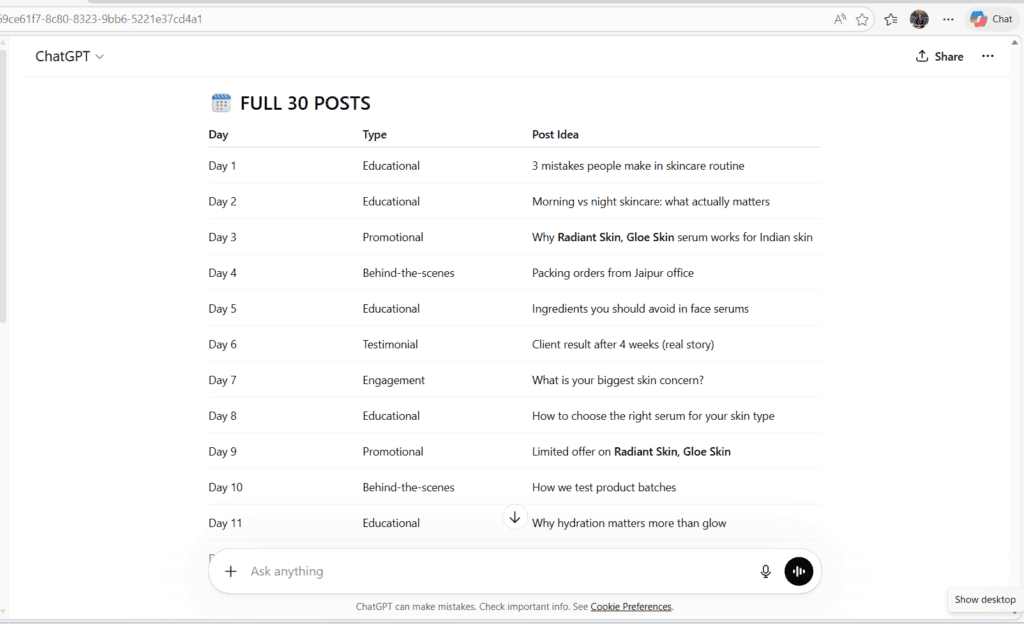
I decide the post types before generating anything: educational, promotional, behind-the-scenes, testimonial, engagement question, reel hook. For 30 posts, I typically use: 10 educational, 6 promotional, 5 behind-the-scenes, 4 testimonial, 3 engagement, 2 reel scripts. This mix prevents the repetition that kills AI-generated calendars.
Perplexity — for trending topic research in the niche
3. Batch generation — 40 minutes
I generate by category, not all at once. “Write 10 educational Instagram captions about [topic] for a [brand tone] brand targeting [audience]. Each must be under 150 words, end with a question, and avoid starting with ‘Are you…'” Generating by category keeps output focused. Mixing all 30 in one prompt produces the “Glow up with…” problem.
Jasper or ChatGPT-4o — depending on the niche
4. Human editing pass — 25 minutes
I read every caption out loud. If it sounds like something any brand could post, I rewrite the first line. I add one specific detail per post — a product name, a local reference, a real customer result. This single step is the difference between content that performs and content that disappears.
Grammarly for consistency — not for creativity
5. Visual brief + scheduling — 20 minutes
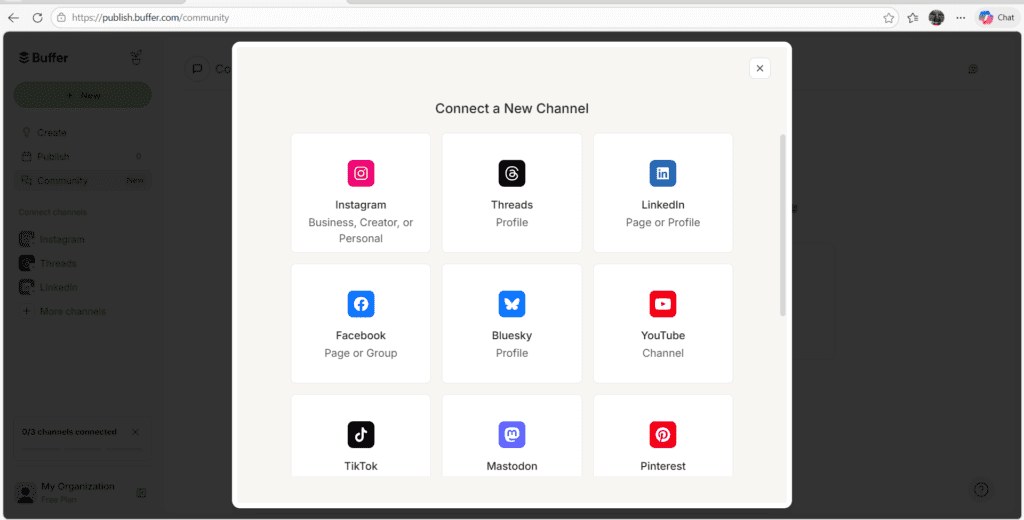
Tool interface used for scheduling social media content
“Screenshot showing how I connect social media platforms using Buffer for scheduling AI-generated content.”
I create a one-line visual brief for each post (not the visual itself — that is the designer’s or Canva’s job). Then all 30 captions go into Buffer with the posting schedule set. Done. The founder reviews and approves in one sitting — no daily decision-making about what to post.
Buffer or Later — both work equally well for this volume
Time breakdown
Brand brief: 15 min · Content mix: 20 min · Batch generation: 40 min · Human edit: 25 min · Scheduling: 20 min = 1 hour 50 minutes total. Manual equivalent for the same output: 6–8 hours across multiple sessions, with decision fatigue building after day 10.
Where AI actually fails at social media
Every guide about AI for social media skips this part. I am not going to, because understanding these failure modes is what makes the workflow above necessary.
Generic opening lines that stop the scroll
AI defaults to “Are you struggling with…?”, “Unlock the secret to…”, “Your [result] starts here.” These phrases have been used so many times that audiences scroll past them automatically. Real scroll-stopping hooks are specific — a number, a counterintuitive claim, or a direct address to a precise situation.
No brand voice — every post sounds like every other brand
Without a brief, AI produces a tone that is safe, pleasant, and forgettable. A luxury skincare brand and a budget skincare brand will get nearly identical captions from the same generic prompt. Brand voice is the one thing AI cannot generate without your explicit input.
Repetition that audiences notice
Ask AI for 30 posts without a content mix plan and you will get 30 variations of the same message. Audiences who follow you for a month will notice. I have seen engagement drop 40% in week 3 on accounts that published unedited AI calendars — the variety runs out and the algorithm deprioritises repetitive content.
No local or cultural context
For Indian brands — especially those targeting regional audiences in cities like Jaipur, Lucknow, or Surat — AI captions have no cultural reference point. A festival, a local slang term, a Hindi phrase in an otherwise English caption: these details create connection. AI cannot supply them without your input.
Call-to-action that asks for everything
Left to its own, AI ends every caption with “Like, comment, save, and share!” That is four competing asks in one line. Real social strategy uses one CTA per post, matched to the post type — educational posts ask a question, promotional posts drive to link in bio, testimonials ask for DMs.
The worst outcome: a founder publishes 30 AI captions unedited, engagement drops, and concludes “AI does not work for social media.” It works — but only inside a system that corrects these five failure modes.
AI caption vs what actually worked — real comparison
Same brand, same product, same brief. This is what ChatGPT produced with a generic prompt vs what went live after editing.
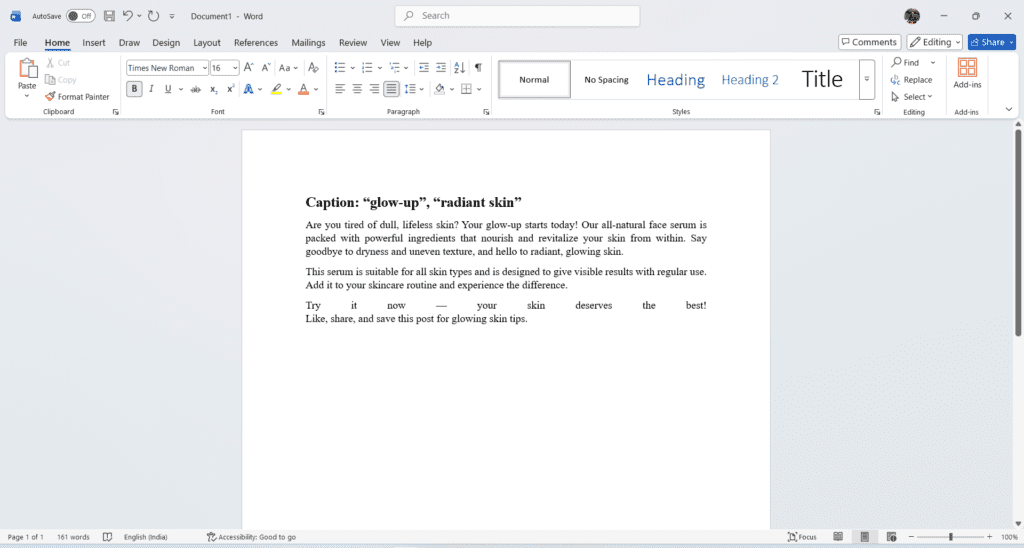
Performance (Typical AI Output):
- Avg Reach: 340
- Saves: 4
- Comments: 1
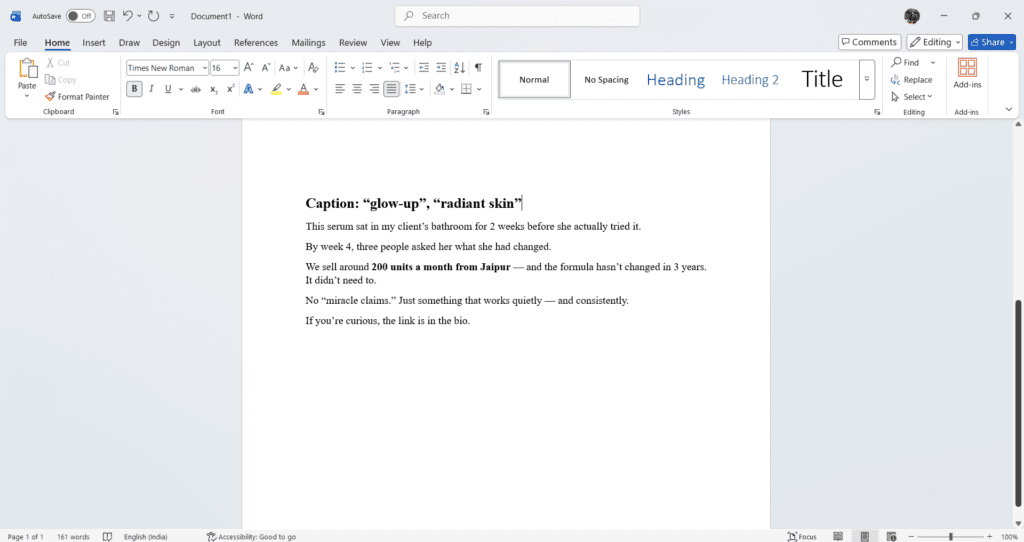
Performance (After Editing):
- Avg Reach: 1,240
- Saves: 67
- Comments: 23
- 3 direct messages asking to order
The edited version is shorter, more specific, and tells a real story. No generic phrases. No four-part CTA. It reads like a person wrote it — because a person finished it.
→ AI vs Human Writing: what actually ranks→ Complete AI writing tools guide 2026
Sample content calendar — 7-day structure
This is the weekly framework I use as the base for every 30-day calendar. The mix is intentional — each day serves a different audience need and a different algorithm signal.
7-day content framework (repeat across 4 weeks with variation)
| Monday | Educational | “3 things most people get wrong about [topic]” — builds authority, high save rate, algorithm favourite for reach |
| Tuesday | Reel / Video | 30-second process or before/after — AI writes the script hook and structure, human records or briefs the creator |
| Wednesday | Behind the scenes | Real moment from the business — AI cannot generate this, only the caption structure. The content itself must be real. |
| Thursday | Testimonial | Customer result with a specific number or detail — “She used it for 21 days. Here is what changed.” AI formats; you supply the story. |
| Friday | Promotional | One product, one benefit, one CTA. No stacking. AI drafts, human removes anything that sounds like an ad. |
| Saturday | Engagement | “Which do you prefer — X or Y?” / “Tell me your biggest challenge with [topic]” — AI generates 5 options, you pick the one that fits your audience |
| Sunday | Story / Personal | Brand story, founder moment, or week recap — highest authenticity requirement. AI can only help with structure here. |
Repeat this 7-day structure across 4 weeks with different topics, products, and customer stories. The framework stays the same. The content never repeats. That is the system.
The hybrid model — why this is not about AI replacing you
The 2-hour figure gets people’s attention, but it misrepresents what is actually happening. AI does not create the content in 2 hours. The system runs in 2 hours. Those are different things.
AI contributes speed, structure, and volume. In a 30-day calendar, AI handles: first-draft captions, post structure suggestions, hashtag research, and caption length variation. That work takes a human 6–8 hours done manually. AI collapses it to 40 minutes of generation plus 25 minutes of editing.
What AI cannot do in this workflow: supply the brand voice, add the local detail, write the real testimonial, make the judgment call about what a specific audience responds to on a specific week. The Jaipur startup’s best-performing post in March was about the founder’s grandmother’s skincare routine. AI did not suggest that. The founder did, during the brief conversation before we started. AI formatted the caption once she told me the story.
Expert insight
The value of a social media strategist does not shrink when AI is in the workflow — it shifts. The job moves from writing captions to designing the system, supplying the real stories, and making the judgment calls that AI cannot. That is higher-value work. The clients who understand this pay for strategy, not just posts.
FAQs
Q. Can AI create viral content?
Not by itself. Virality comes from timing, cultural relevance, and a genuine human reaction — none of which AI can predict or engineer. What AI can do is produce enough volume that you are posting consistently, which is the actual prerequisite for any post going viral. Frequency creates the opportunity. Quality creates the result.
Q. How many posts should I generate at once?
30 days maximum per session. Beyond that, content becomes too disconnected from what is currently relevant to your audience. I regenerate monthly, not quarterly — trends shift fast enough that a 90-day AI calendar will feel stale by month two.
Q. Is AI content safe for Instagram growth?
Yes, as long as it goes through a real editing pass. Instagram’s algorithm does not detect AI text. What it does detect is low engagement — which unedited AI content reliably produces because generic captions get ignored. Edit properly and the platform cannot tell the difference. Your audience can, though.
Q. Do I need to disclose that I used AI?
Currently, no platform requires AI disclosure for standard social media posts. Some brand partnerships and paid promotions have their own transparency requirements — check the specific contract. For organic content, the only disclosure that matters is to yourself: is this content accurate, is it genuinely useful, would I stand behind it?
Q. Which AI tool is best for social media captions?
For Instagram and Hindi-English mixed content — Jasper with a custom brand tone template. For LinkedIn and long-form posts — Claude. For quick idea generation and trending topic hooks — Perplexity. The tool matters less than the brief you give it.
→ Best AI tools for content creators 2026→ How to write better AI prompts for social media
Jasper AI Review 2026: Is It Really Worth $49/Month?
References
- Metricool — Social Media AI Report 2025: metricool.com
- Buffer — AI tools for social media content creation: buffer.com/resources
- Canva — Magic Studio features: canva.com
- Adobe — Firefly AI image generation: firefly.adobe.com
- Mordor Intelligence — AI in social media market growth forecast 2026
AI Content Writing Vs Human Writing: What Google Actually Prefers In 2026
About Author
Dr. Rekha Khandelwal is a certified expert in AI tools and academic content development, with a strong focus on leveraging platforms like ChatGPT, Claude, and Gemini for research and digital writing. With a Ph.D. in Law and specialized training in AI-driven content creation, she helps students, researchers, and professionals create high-quality, SEO-optimized, and impactful content.
Author Profile Dr. Rekha Khandelwal | Academic Writer, Legal Technical Writer, AI Expert & Author | AspirixWriters
- Motivational, Creative & Ghostwriting
- Legal & Technical Writing Services
- Academic Writing Assistance
- Editing & Proofreading
- SEO Blogwriting Services
AI SEO Checklist 2026: How to Rank Your Website in ChatGPT, Perplexity & Google AI Overviews
Here is an uncomfortable reality:Read expert guide on AI SEO Checklist, Research by Dr. Rekha…
AI Content Writing vs Human Writing: What Google Actually Rewards
Artificial Intelligence: My Complete Guide, Real Tools & Workflow AI Content Writing vs Human Writing:…
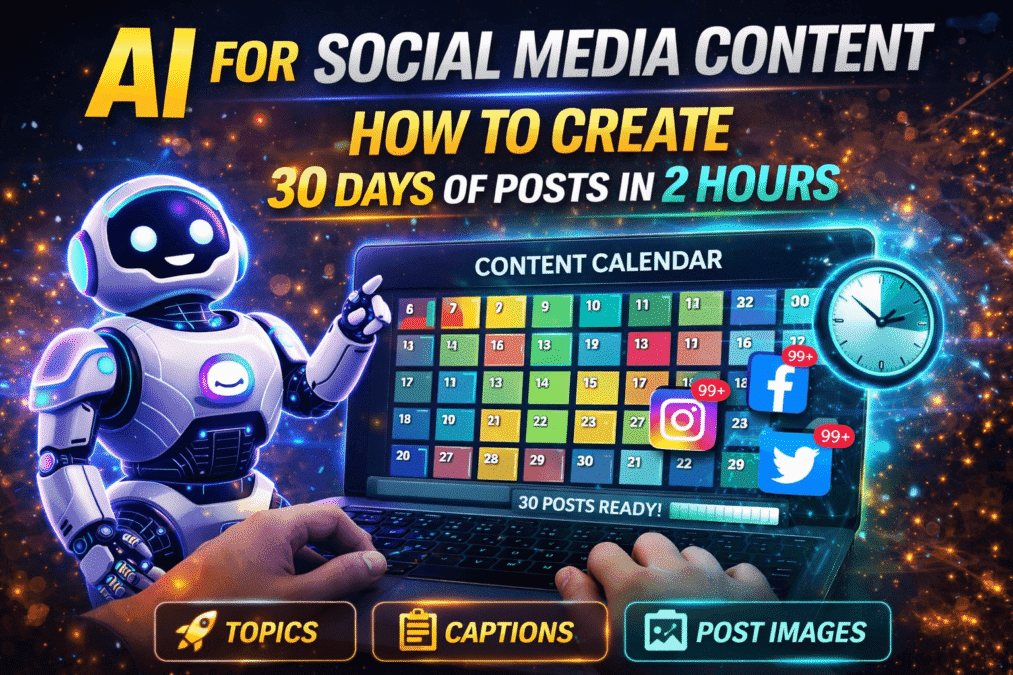
AI for Social Media: How I Create 30 Days of Posts in 2 Hours
Most people who try AI for social media content make the same mistake: they open…
How to Use AI to Write Blog Posts Faster — My Real Step-by-Step Workflow
Artificial Intelligence: My Complete Guide, Real Tools & Workflow How to Use AI to Write…
AI in Content Creation: 2026 Guide, Tools & Best Practices
AI in Content Creation A simple, beginner-friendly guide to using AI for writing, designing, and…