
Last Updated: April 13, 2026
AI Chatbots Customer Support
The Customer Support Problem Every Small Business Knows
It’s 9 PM on a Tuesday. A potential customer lands on a small gift shop’s website in Jaipur. They have a simple question: do you deliver to Jodhpur?
There’s no live chat. No WhatsApp quick reply. No way to get an answer before they move on to the next website.
By morning, the enquiry is gone.
This scenario plays out across thousands of Indian small businesses every day — not because the owners don’t care about customer service, but because maintaining 24-hour availability requires staff they can’t always afford. A one- or two-person business in Rajasthan, a freelance service provider in Bangalore, a home bakery in Mumbai — they’re all experiencing the same gap between when customers ask questions and when answers are available.
AI chatbots address a specific part of this problem: they handle routine, repetitive queries automatically — store hours, pricing, availability, delivery areas, return policies — at any time of day, without requiring a person to be sitting at a screen.
They don’t solve every customer service challenge. They don’t replace good human judgement on complex issues. But for the specific gap of “customer asks a simple question outside business hours,” they are a practical, affordable, and increasingly accessible solution.
This guide explains how they work, which tools are worth considering for Indian SMBs, how to set one up without technical expertise, and — importantly — where their limitations lie.
What AI Chatbots Actually Do (And What They Don’t)
Before investing time or money in any chatbot tool, it’s worth being clear about what these systems actually do in a small business context.
What they handle well:
- Answering frequently asked questions (store hours, product availability, pricing, delivery areas, return policies)
- Collecting basic customer information (name, contact number, order reference) before routing to a human
- Providing instant acknowledgement during off-hours (“Thanks for reaching out — we’ll respond by 10 AM tomorrow”)
- Routing specific query types to the right team member or department
- Sending automated follow-ups for incomplete enquiries
What they don’t handle well:
- Complex, multi-step customer complaints that require context and judgement
- Situations requiring empathy — customer is frustrated, upset, or dealing with a service failure
- Product recommendations that require genuine understanding of the customer’s specific situation
- Anything outside their programmed knowledge base — they will not improvise
The honest framing: an AI chatbot is a first-response system. It handles the simple, repeatable queries that currently consume a disproportionate amount of your or your team’s time. The difficult, nuanced interactions still need a human.
Free AI Chatbots for Small Businesses in India
Several chatbot platforms offer meaningful free plans — sufficient for a small business testing the concept or handling low-to-moderate query volumes.
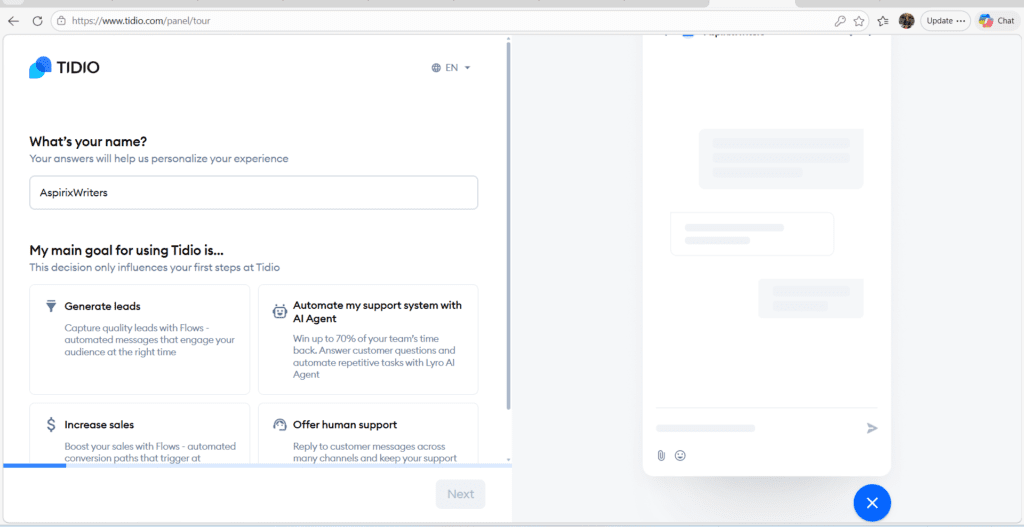
Tidio (Free Plan) Tidio’s free plan includes a basic chatbot builder, live chat, and email integration. It works on websites and can be set up without coding. The interface is one of the most beginner-friendly available. Free plan limitations include a cap on conversations per month and restricted automation flows. For a small business website receiving under 100 monthly chat enquiries, the free plan is often sufficient to start. Paid plans begin at approximately ₹2,000–₹3,000/month (pricing varies — check current rates on their website).
Zoho SalesIQ (Free Plan) Zoho SalesIQ offers a free plan that includes basic live chat and a simple chatbot builder. Its primary advantage for Indian businesses is native integration with Zoho CRM — if you’re already using Zoho for customer management, SalesIQ connects seamlessly. The free plan is more limited than Tidio’s in terms of chatbot sophistication, but it’s a sensible starting point if your business is already in the Zoho ecosystem.
Freshchat (Free Plan) Freshchat by Freshworks is designed specifically for customer support workflows. The free plan covers basic messaging across web and mobile. Its strength is in support ticket management and team inbox features rather than advanced chatbot automation. Best suited for businesses that receive support queries rather than sales enquiries. Paid plans for more advanced AI features start at pricing that should be verified directly on the Freshworks India pricing page, as this changes periodically.
Quidget Quidget is a newer, more budget-focused option designed for small businesses. It focuses on quick FAQ-style chatbot deployment without requiring significant technical setup. Worth evaluating for businesses that need a simple question-answer bot rather than a full customer support platform.
Important note on pricing: All pricing information in this guide reflects approximate market rates as of early 2026 and should be verified directly with each provider before making any purchasing decision. Pricing changes frequently, especially for Indian market plans.
WhatsApp AI Customer Support — How It Works and What It Costs
WhatsApp is where most Indian small business customer conversations already happen. A WhatsApp AI support bot connects to your WhatsApp Business account and handles automated responses to incoming messages.
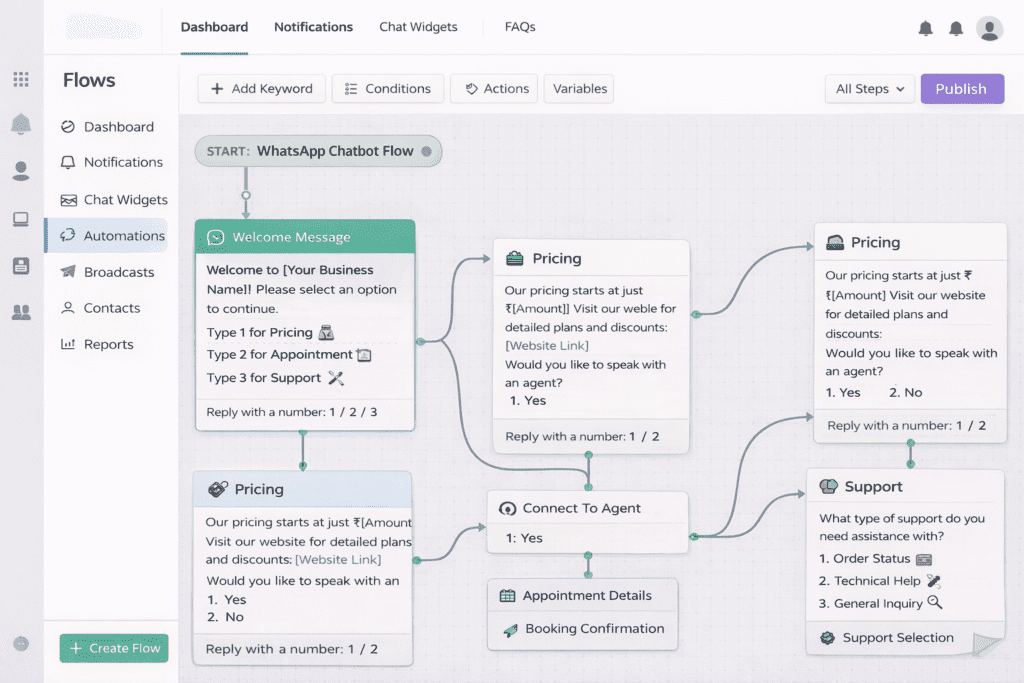
How it works in practice: A customer messages your WhatsApp Business number. If their message matches a configured trigger (specific keywords, menu options, or question patterns), the bot responds automatically. If the query doesn’t match any automation, it routes to a human agent or saves the message for follow-up.
Indian providers worth evaluating:
- AiSensy — designed for Indian businesses, WhatsApp Business API access included, Hindi template support available
- Interakt — another Indian provider with INR pricing, focused on WhatsApp automation for e-commerce and service businesses
- Wati — slightly more feature-rich, suitable for businesses with higher query volumes
On pricing: WhatsApp AI bot costs depend on the provider, the plan tier, and WhatsApp’s own conversation-based pricing (Meta charges per conversation, which the provider passes through). Monthly costs for small businesses typically start around ₹1,000–₹3,000/month for entry-level plans. Exact current pricing must be verified with each provider directly — these rates change as WhatsApp Business API pricing evolves.
Realistic use case example: A Jaipur handicraft retailer receives 40–60 WhatsApp messages daily, of which approximately 60–70% are the same 8 questions. A WhatsApp bot configured to answer those 8 questions automatically could meaningfully reduce the owner’s daily message-handling time. The remaining complex or unusual messages still require manual response.
Tool-by-Tool Breakdown: When to Use Which
| Tool | Best For | Free Plan? | Primary Strength |
|---|---|---|---|
| Tidio | Website-based chat for service/product businesses | Yes | Easiest setup, most beginner-friendly |
| Zoho SalesIQ | Businesses already using Zoho CRM | Yes | CRM integration, unified customer view |
| Freshchat | Support-heavy businesses with ticket management needs | Limited | Multi-channel support inbox |
| Quidget | Very small businesses needing simple FAQ bots | Limited | Simple, fast deployment |
| AiSensy / Interakt | WhatsApp-first customer communication | Paid | WhatsApp Business API, Hindi support |
The selection principle: Don’t choose a tool based on features you don’t need yet. Choose the tool that solves your most immediate, specific customer communication gap. A business that primarily communicates on WhatsApp should start with a WhatsApp-specific solution. A business with a website getting chat enquiries should start with Tidio or SalesIQ.
How to Set Up an AI Chatbot Step by Step
This process applies broadly across most no-code chatbot platforms and is designed to be completed without any technical background.
Step 1 — Choose Your Platform and Channel
Decide where your customer conversations currently happen most. Website chat? WhatsApp? Both? Your most active channel should be where you deploy first.
Sign up for a free plan on your chosen platform (Tidio for website, AiSensy or Interakt for WhatsApp).
Step 2 — List Your 8–10 Most Common Customer Questions
Before configuring anything, write down the questions your business receives most frequently. Examples for a retail business:
- What are your store hours?
- Do you deliver to [city]?
- What is your return policy?
- How long does delivery take?
- What payment methods do you accept?
These become the foundation of your chatbot’s knowledge base. A chatbot configured to answer these well will handle a significant portion of your routine queries.
Step 3 — Build Your Basic Response Flows
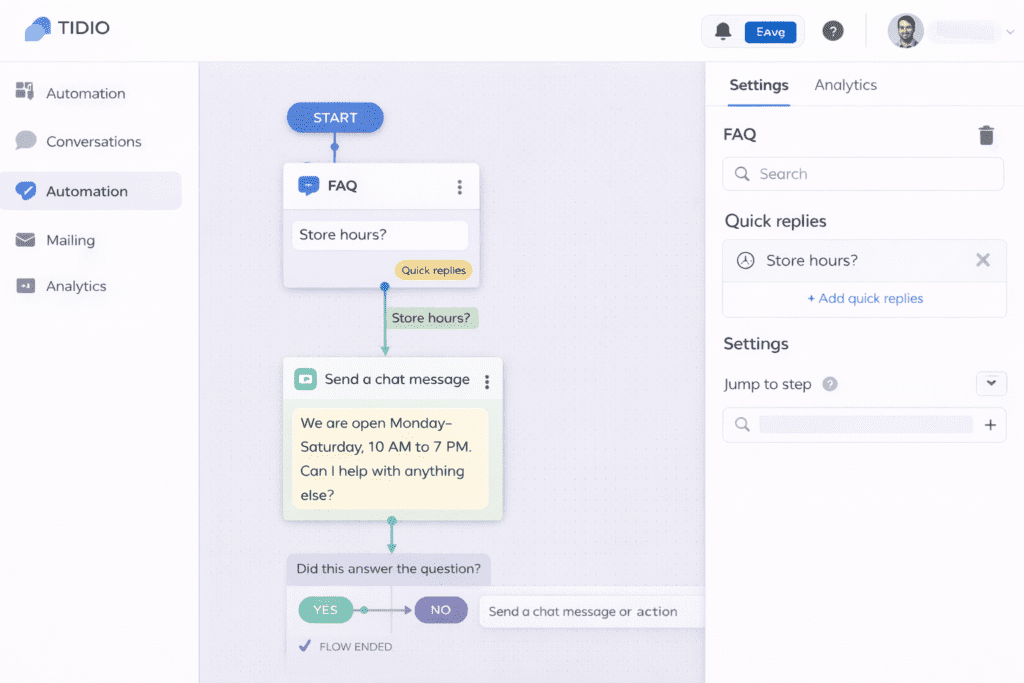
In your chosen platform, create a response for each question. Most no-code chatbot builders use a visual flow editor — you create a question trigger (the words or phrases that activate a response) and a corresponding answer.
Start with text-only responses. Keep answers short and direct. For each response, add an option for the user to connect with a human if they need further help.
Step 4 — Connect to Your Website or WhatsApp
- For website: Install the provided code snippet in your site’s header (most platforms provide a WordPress plugin or simple copy-paste code), or connect via your website builder’s integration settings
- For WhatsApp: Connect your WhatsApp Business account to the platform via the Business API authentication process (typically guided step-by-step within the platform)
Step 5 — Test Thoroughly Before Going Live
Send test messages covering every configured scenario. Ask a colleague or friend to try queries the bot isn’t configured for — observe what happens when it doesn’t recognise a query and make sure the fallback (connect to human, leave a message) works correctly.
Step 6 — Review and Refine Weekly
After the first week of live operation, check your conversation logs. Which queries are being handled well? Which are falling through to human agents when they shouldn’t? Which are being handled incorrectly? Update your response flows based on real conversation data.
Hindi and Local Language Support — Why It Matters
A significant portion of small business customer interactions in India happen in Hindi, regional languages, or Hinglish — a natural mix of Hindi and English that most Indian customers use comfortably.
A chatbot that can only respond in formal English creates friction for customers who naturally write “delivery kab hogi?” or “price kya hai?” in their WhatsApp messages.
What to look for in Hindi-capable bots:
- Template messages in Hindi (for WhatsApp bots — Meta requires pre-approved templates for outbound messages)
- Keyword triggers that recognise common Hinglish phrases
- Response text written in Hindi or Hinglish where appropriate for your customer base
Practical approach: Configure your bot to respond in the language your majority customer base uses. For a Jaipur-based business primarily serving local customers, a mix of Hindi and simple English responses will serve customers better than formal English only. Most platforms allow you to write response text in any language — the language capability depends on how you write the responses, not usually on technical language processing.
Limitation to be honest about: Most chatbot platforms at the free and entry-level tier don’t have sophisticated natural language processing in Hindi. They recognise specific keywords and phrases that you’ve configured — they don’t understand arbitrary Hindi text the way a human would. Setting realistic expectations with your customers (via the bot’s opening message) about what it can and can’t help with reduces frustration.
What Chatbots Cannot Do (Read This Before Deciding)
This section is important enough to deserve direct, unambiguous treatment.
AI chatbots assist customer support — they do not replace it.
Specifically:
They cannot handle complex complaints effectively. A customer who has received the wrong order, experienced a billing error, or had a genuinely bad service experience needs a human response with appropriate empathy and authority to resolve the situation. A bot that deflects or gives a templated response to a serious complaint makes the situation worse, not better.
They require regular maintenance. A chatbot configured in January and left unchanged is less useful in June — your products, prices, policies, and common questions evolve. The bot needs to evolve with them. Neglected chatbots that give outdated information damage trust more than no chatbot at all.
They struggle with ambiguity. “What’s your best product?” or “Is this worth buying for my mother?” — questions that require understanding the customer’s specific context — are not well-suited to chatbot responses at the entry level.
They need a reliable human escalation path. Every chatbot deployment needs a clearly configured fallback: when the bot can’t answer, the customer should be routed to a human channel immediately, not left waiting or given a generic “I’ll let the team know” message that disappears into a void.
The businesses that benefit most from chatbots are those that understand these limits and deploy the tool within them — not those that view the chatbot as a complete customer service replacement.
Real Workflow: How Customer Queries Flow Through a Chatbot
Customer sends message (WhatsApp / Website chat)
↓
Chatbot recognises query type
↓
┌─────────────────────────────────┐
│ │
Recognised query Unrecognised query
│ │
Bot answers automatically Bot offers options:
(Hours / Pricing / FAQs) 1. Leave your number
2. Connect to human now
↓ 3. View FAQ menu
Customer satisfied
↓
End of interaction Human agent picks up
[Optional: feedback conversation in platform
or follow-up prompt] dashboard
The critical element: The human escalation path must actually work. Messages flagged for human follow-up need to be checked promptly — ideally within your stated business hours. A chatbot that collects enquiries that no one follows up on creates a worse customer experience than having no chatbot at all.
Frequently Asked Questions
Q1. How can I set up an AI chatbot for 24/7 customer support?
Choose a platform (Tidio for website, AiSensy for WhatsApp), list your 8–10 most common customer questions, configure automated responses using the platform’s visual builder, connect it to your website or WhatsApp Business account, test thoroughly, and review conversation logs weekly to improve responses.
Q2. Which free AI chatbot is best for small businesses in India?
Tidio is the most beginner-friendly option for website-based chat with a meaningful free plan. Zoho SalesIQ suits businesses already using Zoho CRM. For WhatsApp-first businesses, AiSensy and Interakt are the most India-focused options, though they require paid plans. The right choice depends on where your customers currently contact you most.
Q3. Can AI chatbots fully replace customer support teams?
No. AI chatbots handle routine, repetitive queries efficiently — store hours, basic pricing, order status, FAQs. They are not equipped to manage complex complaints, nuanced enquiries, or situations requiring empathy and judgement. Every chatbot deployment needs a reliable human escalation path.
Final Thoughts
The goal of a chatbot is not automation for its own sake. The goal is faster and better customer response — ensuring that a simple question at 10 PM gets an immediate, accurate answer rather than a missed opportunity.
For a small business in Rajasthan, or anywhere in India, that spends a significant portion of each day answering the same questions repeatedly, an AI chatbot is a practical time-recovery tool. It won’t transform your customer experience overnight, and it won’t replace the human interactions that build genuine customer loyalty. But it will ensure that the simple, routine queries that currently fall through the cracks at off-hours are addressed promptly and consistently.
Start with one channel — either your website or WhatsApp, whichever receives more enquiries. Configure responses for your ten most common questions. Review weekly. Adjust monthly.
The technology is accessible, the entry cost is low, and the time recovered is real. The key is realistic expectations: deploy it for what it’s genuinely good at, and keep humans available for everything else.
References:
- WhatsApp Business API Overview: https://business.whatsapp.com/products/business-platform
- Tidio: https://www.tidio.com
- Zoho SalesIQ: https://www.zoho.com/salesiq/
- Freshchat: https://www.freshworks.com/live-chat-software/
- AiSensy: https://aisensy.com
- Google AdSense Programme Policies: https://support.google.com/adsense/answer/48182
AI for Small Businesses: Practical Tools & Growth Guide
About the Author
Dr. Rekha Khandelwal is an academic content writer and AI prompt engineer specializing in research writing and AI-powered tools. She helps students and researchers simplify complex academic work through practical, technology-driven solutions.
Author Profile Dr. Rekha Khandelwal | Academic Writer, Legal Technical Writer, AI Expert & Author | AspirixWriters
AI Chatbots Customer Support: 24/7 Help Guide for Small Businesses in India (2026)
AI Chatbots Customer Support The Customer Support Problem Every Small Business Knows It’s 9 PM…
AI for Small Businesses in India: Practical Tools, Costs & Growth Strategy (2026)
AI for Small Businesses in India: Artificial Intelligence My Complete Guide, Real Tools & Workflow…
AI in Digital Marketing: Trends and Tools (2026)
The India SMB Reality A Rajasthan startup founder shared her weekly content situation: three social…
AI in Email Marketing: Smarter Emails for Better Engagement in 2026
AI in Email Marketing Why email marketing still works in 2026 Social media is noisy….
AI in Market Research: 2026 Trends, Tools & Practical Insights
AI in Market Research The Research Gap That Costs Small Businesses More Than They Realise…
AI in Sales Automation: Practical Guide, Tools and Conversion Strategy for Small Businesses in India (2026)
AI in Sales Automation The Lead Problem Nobody Talks About Here’s a situation that most…
Best AI Tools for Business & Marketing: Complete Guide for Growth in 2026
Best AI Tools for Business & Marketing The real problem most businesses have with AI…