Last Updated: May 1, 2026
Internal Linking Strategy for Content Marketing
The Simple Fix That Most Bloggers Completely Ignore
A few months into running this blog, I noticed something in my Google Search Console data that didn’t make sense.
One of my most thoroughly researched articles — a 2,000-word guide I was genuinely proud of — was sitting on page three for its target keyword. Meanwhile, a thinner, older article on a related topic was ranking on page one.
I checked backlinks. The older article had more. I checked keyword optimisation. Both were comparable. I checked page speed. Both were fine.
Then I looked at internal links.
The older article had eleven internal links pointing to it from other pages on my site. The newer, better article had exactly two — both from the same category page. Google had no strong signal that the newer article was important. No other page was vouching for it. In the internal link economy of my website, it was an orphan.
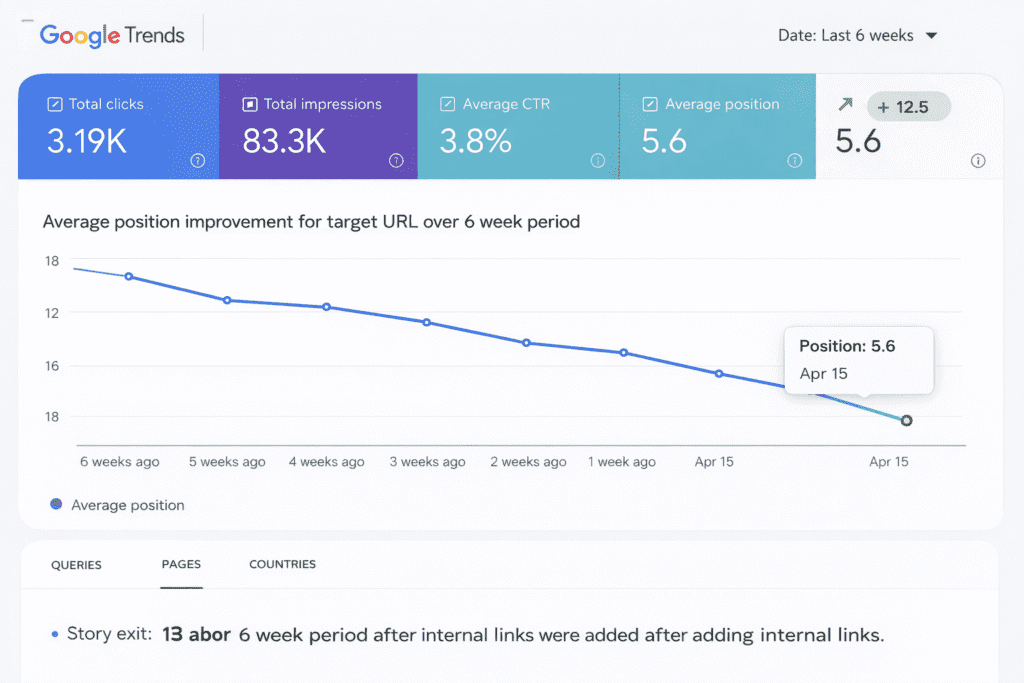
I spent one afternoon adding contextual internal links to the newer article from seven related posts. Within six weeks, it climbed from position 28 to position 7.
Not a single new backlink. Not a single content change. Just internal links — pointing Google’s attention to a page it had been largely ignoring.
This is the power of a deliberate internal linking strategy. And it is, without question, one of the most underused SEO levers available to every content marketer and blogger working today.
This guide covers everything: how internal linking actually works, a step-by-step strategy you can implement this week, anchor text rules, common mistakes, and a checklist for every article you publish going forward.
What Is Internal Linking -And Why Google Cares
An internal link is any hyperlink on your website that points to another page on the same website.
When you write an article about content writing tools and link to your separate article about Grammarly — that’s an internal link. When your homepage links to your services page — that’s an internal link. When a footer menu links to your about page — that’s an internal link.
But not all internal links are equal. And the difference between a strategic internal link and a random one is the difference between a page that ranks and a page that doesn’t.
Why Google cares about internal links:
Google’s crawler — the automated system that reads and indexes your website — follows links to discover content. When a crawler lands on one of your pages, it follows every link on that page to find new pages. Internal links are how Google navigates your entire website.
Beyond discovery, internal links pass what SEO professionals call link equity (sometimes called “PageRank” or “link juice”). When a high-authority page on your site links to a lower-authority page, some of that authority transfers. The linked page becomes more trusted in Google’s assessment.
Think of it this way: internal links are like votes within your own website. When multiple pages on your site all link to a specific article, you’re collectively signalling to Google: “This page is important. This page is worth ranking.”
A page with no internal links pointing to it — what’s called an orphan page — has no votes. Google has no strong reason to prioritise it. No matter how well-written it is.
How Internal Links Actually Boost SEO Rankings
Understanding the mechanics helps you build a strategy rather than just following rules.
1. They help Google discover and index your content faster. New articles get indexed more quickly when they receive internal links from established, frequently-crawled pages — like your homepage, your most popular articles, or your category pages. An article with no internal links pointing to it might wait weeks to be discovered.
2. They distribute page authority across your site. Your homepage and your highest-traffic articles tend to have the most external backlinks — and therefore the most authority. Internal links transfer some of that authority to pages that need ranking support. This is particularly powerful for newer articles that haven’t yet earned their own backlinks.
3. They communicate topical relevance to Google. When a page about SEO writing links to a page about keyword research, Google understands these topics are related. This contextual connection strengthens your topical authority — the signal that your site is a comprehensive resource on a subject, not just a random collection of articles.
4. They improve user experience and reduce bounce rate. When readers find relevant links within your content, they follow them — spending more time on your site, reading more pages, and building a stronger engagement signal. Lower bounce rate and higher session duration are positive user experience signals that indirectly support rankings.
5. They reduce keyword cannibalization. When multiple pages on your site target similar keywords without being clearly connected, they can compete against each other in search results. Strategic internal linking with descriptive anchor text helps Google understand which page is the primary resource for a given topic — and ranks that page instead of splitting attention between competitors.
4 Types of Internal Links (And When to Use Each)
1. Contextual Links
Links embedded naturally within the body content of an article — within a sentence or paragraph that flows into the linked topic.
When to use: Always. These are the most valuable type of internal link because they appear in content Google reads carefully, surrounded by relevant context that reinforces topical connection.
Example: “Once you’ve identified your target keywords, the next step is building a content calendar that organises your publishing schedule around those topics. [See our complete guide to creating an SEO content strategy.]
2. Navigational Links
Links in your site’s navigation menu, sidebar, or header — typically linking to main category pages or cornerstone content.
When to use: For your most important pages. Navigation links appear on every page of your site, which gives them enormous internal link volume — but also dilutes their individual value. Reserve navigation links for your highest-priority pages.
→ How to Create an SEO Content Strategy for Your Website
3. Footer Links
Links in your website footer — typically privacy policy, contact, about, and key service pages.
When to use: Sparingly, for genuinely important institutional pages. Footer links have the least SEO value of any internal link type because they appear on every page but carry minimal topical relevance signal.
4. Related Posts Links
Links to other articles suggested at the end of a post — typically “You might also like” sections or content recommendation modules.
When to use: As a secondary layer to your contextual linking strategy. Related posts links improve user experience and session depth, but they carry less SEO weight than contextual links because they lack the surrounding topical context.
The rule: Prioritise contextual links embedded naturally within your content. These carry the most SEO value and serve both Google’s understanding and your reader’s experience simultaneously.
Internal Linking Strategy: Step-by-Step for Content Marketers
Step 1 — Audit Your Existing Internal Links
Before building a new strategy, understand what you currently have.
Free method: Use Google Search Console’s “Links” report to see which pages on your site have the most internal links pointing to them, and which pages have very few.
What to look for:
- Pages with zero or one internal link (orphan pages — immediate opportunity)
- Pages with dozens of links but poor rankings (may indicate anchor text issues)
- Your most important pages — are they receiving sufficient internal link support?
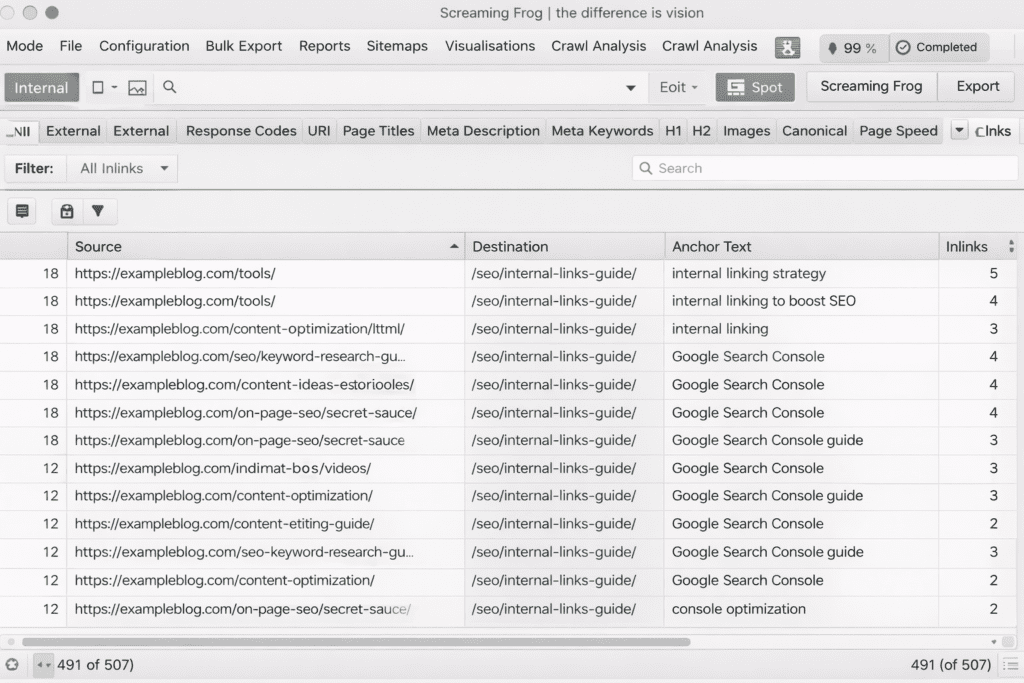
Tool: Screaming Frog SEO Spider (free for up to 500 URLs) crawls your entire site and generates a complete internal link report, showing every link, its anchor text, and which pages are receiving the most internal equity.
Step 2 — Map Your Site Architecture
Healthy site architecture looks like a pyramid:
Homepage
↓
Category Pages / Pillar Pages
↓
Individual Articles / Cluster Pages
Links should flow downward from homepage to categories to articles — and back upward from articles to their parent categories and pillar pages.
The three-click rule: Any page on your site should be reachable within three clicks from the homepage. Pages buried deeper than three clicks are difficult for Google to discover and often receive minimal crawl attention.
Action: Draw a simple map of your site’s content structure. Identify which articles belong to which categories or topic clusters. This becomes the blueprint for your internal linking decisions.
Step 3 — Identify Your Pillar Pages
Your pillar pages are your most comprehensive, most important pieces of content — the articles you most want to rank for competitive keywords.
Every pillar page should:
- Receive internal links from all cluster articles within its topic
- Link out to all cluster articles within its topic
- Be linked from your homepage or navigation when possible
- Be mentioned and linked in any new article that touches its subject
If a pillar page isn’t receiving at least 8–10 internal links from other pages on your site, it’s under-supported.
Topic Cluster Strategy: How To Build Topical Authority
Step 4 – Write Descriptive, Keyword-Rich Anchor Text
Anchor text is the clickable text of a link. It is one of the strongest signals in internal linking because it tells Google exactly what the linked page is about.
The anchor text spectrum:
| Type | Example | When to Use |
|---|---|---|
| Exact match | “internal linking strategy” | Use sparingly — 1–2 times per target keyword |
| Partial match | “building your internal link structure” | Most common, natural |
| Branded | “Aspirix Writers’ SEO guide” | For brand-specific pages |
| Generic | “click here,” “read more,” “this article” | Avoid — provides no topical signal |
| Naked URL | “www.example.com/page” | Avoid in body content |
The rule: Never use “click here” or “read more” as anchor text. These are wasted opportunities. Every internal link anchor text should describe the topic of the destination page using natural language that includes the target keyword or a close variation.
Good example: “For a complete breakdown of how to structure your content for maximum SEO impact, our Step-by-Step Guide to Writing an SEO-Optimised Blog writing That Ranks on Google (2026) covers every element.”
Weak example: “For more information, [click here].”
Step 5 — Link New Pages to Old, and Old Pages to New
This is the habit that separates content marketers with strong internal link structures from those with weak ones.
When you publish a new article:
- Immediately identify 3–5 older articles that cover related topics
- Add a contextual internal link from each of those older articles to your new article
- This gives your new article immediate internal link support before it has earned any external backlinks
When you publish a new article:
- Also link from the new article to 3–5 relevant older articles
- This creates reciprocal topical connection that strengthens the cluster
Why this matters: New articles typically rank slowly because they have no backlinks and minimal authority. Internal links from your established, already-ranked pages transfer authority immediately — giving new content its best possible start.
Pro Tip: Keep a running list in Notion or Google Sheets of your published articles, their target keywords, and their category/cluster. Before publishing any new article, consult this list to identify which existing articles to update with links to the new page.
Step 6 — Build Internal Linking Into Your Content Brief
The most efficient internal linking strategy isn’t retrofitting links after publishing — it’s planning them before writing begins.
Every content brief should include:
- 3–5 articles this new piece should link TO (based on related topics in the existing library)
- 3–5 existing articles that should link TO this new piece (to be updated immediately after publishing)
- Suggested anchor text for both directions
This turns internal linking from a forgotten afterthought into a systematic part of your production process.
How Many Internal Links Per Article?
There’s no definitive universal rule — but practical guidelines exist.
For a standard 1,200–1,800 word article: 3–6 internal links is a healthy range. Enough to create meaningful topical connections without overwhelming the page or diluting individual link value.
For a pillar page (2,500–4,000 words): 8–15 internal links is appropriate — linking out to every cluster article in its topic, plus relevant connections to other pillars.
The quality test: Every internal link should pass this question: “If this link disappeared, would the reader miss it? Does it genuinely help them find something more useful?” If yes — keep it. If it’s there just to meet a count target — remove it.
Google actively identifies and discounts manipulative or excessive internal linking. Natural, genuinely helpful links always outperform link-stuffed pages.
Anchor Text Best Practices (With Examples)
Vary your anchor text for the same destination page. If ten different articles all link to your pillar page using exactly the same anchor text — “SEO content strategy guide” — it looks unnatural. Use variations:
- “building an SEO content strategy”
- “how to plan your content for search”
- “content strategy for bloggers”
- “our complete guide to SEO content planning”
Match anchor text to the destination page’s target keyword. The anchor text signals to Google what the linked page is about. If your linked page targets “internal linking strategy,” your anchor text should include those words or close variations — not a completely unrelated phrase.
Keep anchor text concise. Ideal anchor text is 2–6 words. Long anchor text phrases become awkward to read and dilute the keyword signal.
Never force anchor text into a sentence unnaturally. If you can’t link to a page naturally within the flow of a sentence, it’s better to restructure the sentence than to insert a clunky link. Forced internal links harm readability — and readability is a signal Google monitors through engagement metrics.
Step-by-Step Guide to Writing an SEO-Optimised Blog
Common Internal Linking Mistakes That Hurt Rankings
Linking with generic anchor text. “Click here,” “read more,” “this post” — these provide zero topical context to Google. Every one of these is a missed opportunity to signal relevance. Replace all generic anchor text with descriptive phrases.
Creating orphan pages. Publishing articles that receive no internal links from other pages. Orphan pages are effectively invisible to Google’s priority assessment. Every new page should receive at least two contextual internal links from existing content on the day it’s published.
Over-linking to the homepage. Your homepage already has enormous internal link equity from your navigation, footer, and site structure. Adding additional contextual links to it from blog posts wastes link equity that could be directed at pages that actually need ranking support.
Linking only downward — never upward. Many bloggers link from newer content to older evergreen pieces, but forget to link from older established articles back to newer ones. This means new articles start with minimal support and rank slowly. Always update older articles with links to newly published related content.
Ignoring link depth. Pages buried more than three clicks from the homepage rarely receive significant crawl attention. If your best content is only accessible through multiple category pages and archive links, Google may not prioritise it. Bring important pages closer to the surface with direct links from high-traffic pages.
Treating all internal links as equal. A link from your homepage carries far more authority than a link from a page that itself has no external backlinks. When you need to support a page that’s struggling to rank, focus on getting links from your highest-authority pages — not just any page in the cluster.
Tools to Find and Fix Internal Linking Gaps
Google Search Console (Free) The Links report shows which of your pages receive the most internal links and which receive the fewest. Start here for a free, accurate picture of your current link distribution.
Screaming Frog SEO Spider (Free up to 500 URLs) The most comprehensive free tool for internal link auditing. Run a full site crawl and export the internal links report — it shows every link, its anchor text, the source page, and the destination page. Filter for pages with low internal link counts to identify orphan and under-supported pages.
Ahrefs Site Audit (Paid) Flags specific internal linking issues including orphan pages, broken internal links, pages with too few internal links, and anchor text distribution problems. Provides actionable recommendations rather than raw data.
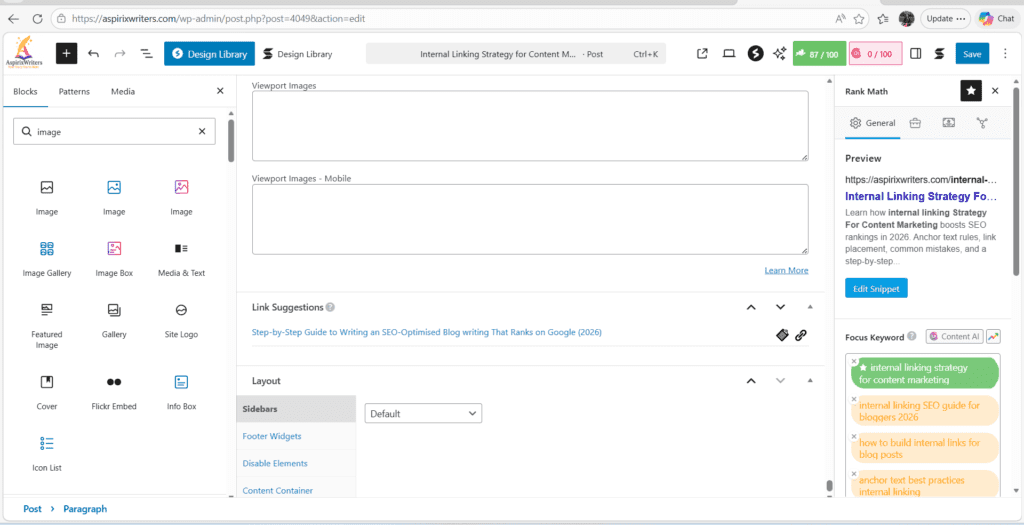
Rank Math / Yoast SEO (Free WordPress plugins) Both plugins suggest related posts and internal linking opportunities directly within the WordPress editor as you write — making it easy to add contextual links without leaving your drafting environment.
Notion or Google Sheets (Free) Your own content library spreadsheet — article titles, target keywords, categories, and current internal link status — is one of the most practical internal linking tools available. Before publishing, consult it. After publishing, update it.
Internal Linking for Topic Clusters and Pillar Pages
Topic clusters and internal linking are not separate strategies — they’re two parts of the same architecture.
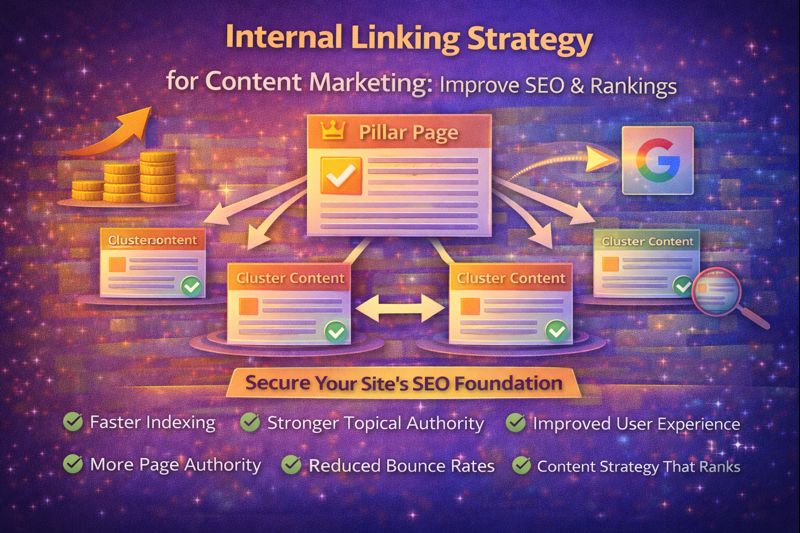
The internal link structure of a properly built topic cluster looks like this:
PILLAR PAGE
(Links to all cluster articles)
↕
Cluster Article 1 ←→ Cluster Article 2
↕ ↕
Cluster Article 3 ←→ Cluster Article 4
↕
Cluster Article 5
(All cluster articles link back to pillar)
Rules for cluster internal linking:
- Every cluster article links back to the pillar page — using anchor text containing the pillar’s target keyword
- The pillar page links out to every cluster article — using anchor text describing each article’s specific topic
- Related cluster articles link to each other where naturally relevant — not forcefully
- No cluster article links to a completely unrelated cluster’s pillar (this dilutes topical clarity)
Why this matters for rankings: When Google’s crawler enters your cluster through any single article, the internal link structure guides it to the entire cluster — teaching Google the topical relationship between all your content on that subject. This is how topical authority is built at a structural level, not just a content level.
→ How to Create an SEO Content Strategy for Your Website
My Internal Linking Audit Experience
When I finally sat down to audit the internal links on this blog properly, the results were uncomfortable.
Out of 34 published articles at the time, 9 were complete orphans — receiving zero contextual internal links from any other page. Some of those 9 were among my best pieces of writing. They simply had no internal vouching. Google had no reason to weight them as important.
I spent one afternoon running through the audit and building a spreadsheet. For each article, I listed which other articles could naturally link to it. Then I went through and added those links — updating the text of existing articles to include a natural contextual reference and link.
Total time: approximately 3.5 hours.
In the following 8 weeks, 7 of those 9 previously-orphaned articles showed measurable ranking improvements. Three climbed from page 3 or 4 to page 1 or 2 for their target keywords — with no other changes made.
This experience taught me something I now consider a non-negotiable principle: every article you publish deserves internal link support on the day it goes live. Building that support retroactively works — but building it proactively is far more efficient.
What Is Generative SEO and How Content Marketers Can Use It
Internal Linking Checklist Before Publishing
Run through this before every article goes live:
Pre-Publishing:
- Identified 3–5 existing articles this new piece should link TO
- Anchor text for each outgoing link is descriptive and keyword-relevant
- No “click here” or “read more” anchor text used anywhere
- Each internal link appears naturally within the flow of the content
- Identified 3–5 existing articles that should link TO this new piece
Post-Publishing (Within 24 Hours):
- Updated 3+ existing articles with contextual links to the new article
- Confirmed the new article is linked from its category or pillar page
- Article appears in the content library spreadsheet with link status noted
- Checked in Google Search Console that the page has been discovered (within 1–2 weeks)
Common Content Writing Mistakes and How to Avoid Them
Before vs After: Internal Linking Example
Topic: A new article on “How to Write Engaging Blog Introductions”
BEFORE (No Internal Link Strategy):
Published with two links: one to a general “content writing” category page, one to an external resource. No existing articles updated to link to the new piece. Result after 6 weeks: Position 41, 12 impressions, 0 clicks.
AFTER (Internal Link Strategy Applied):
Published with 4 outgoing contextual links to: SEO blog writing guide, content writing tips post, common mistakes article, time management for writers post.
Within 48 hours of publishing: Updated 6 existing articles (SEO guide, content strategy post, tools article, content mistakes post, beginner tips post, storytelling guide) to include a contextual mention and link to the new introduction-writing article.
Also linked from the pillar “Complete Content Writing Guide” page.
Result after 6 weeks: Position 8, 340 impressions, 28 clicks, 8.2% CTR.
What changed? The content was identical. The only difference was internal link support — 10 pages on the site now vouching for the new article’s relevance and authority.
CTA → SEO Blog Writing Services page
External Links (for authority and trust):
- Google Search Central — Internal Links: https://developers.google.com/search/docs/crawling-indexing/links-crawlable
- Ahrefs — Internal Linking for SEO: https://ahrefs.com/blog/internal-links-for-seo/
Frequently Asked Questions
Q1. How many internal links should each blog post have?
For a standard 1,200–1,800 word article, 3–6 contextual internal links is the practical sweet spot. For longer pillar pages (2,500+ words), 8–15 links is appropriate given the broader topical coverage. The quality test is more important than any number target: each link should genuinely help the reader find something more useful, not exist purely for SEO mechanics.
Q3. What is the best anchor text for internal links?
Descriptive, keyword-relevant anchor text of 2–6 words. The anchor should describe what the reader will find on the linked page using natural language that includes the destination page’s target keyword or a close variation. Vary the anchor text across different pages linking to the same destination — avoid using identical anchor text from multiple sources, as it appears unnatural.
Q4. What is an orphan page and why does it hurt SEO?
An orphan page is a page on your website that receives no internal links from any other page. Because Google’s crawler follows links to navigate websites, orphan pages may go undiscovered for weeks or receive minimal crawl priority.
Even well-written orphan pages often rank poorly because they receive no internal authority transfer and carry no topical endorsement from the rest of your site. Fix orphan pages by adding contextual internal links from 2–3 related articles immediately.
Q5. Should I go back and add internal links to old articles?
Yes — and this is often one of the fastest ways to improve existing rankings. Identify your most important articles that currently receive few internal links, then update 3–5 related articles to include a contextual link. This retroactive internal linking strategy consistently improves rankings within 4–8 weeks, with no content rewriting required.
Final Thoughts
Internal linking is the SEO work that happens after you’ve written something good — the structural layer that makes sure Google notices, values, and ranks what you’ve built.
It doesn’t require new content. It doesn’t require a budget. It doesn’t require technical expertise beyond a basic understanding of how links work and why they matter.
What it requires is intention. The habit of asking, every time you publish: “Which existing pages should be updated to point here? Which pages does this article support with links? Are any of the pages in this cluster under-linked?”
Build that habit. Run the checklist. Audit your site once a quarter.
The writers and content marketers who do this consistently — who treat their website as an interconnected system rather than a collection of individual articles — see compounding ranking improvements that paid tools and backlink campaigns can’t replicate.
Your best content deserves to be found. Internal links are how you make sure it is.
References:
- Google Crawling and Indexing | Google Search Central | Documentation | Google for Developers
- Ahrefs — Internal Links for SEO: https://ahrefs.com/blog/internal-links-for-seo/
- Moz — Internal Linking: https://moz.com/learn/seo/internal-link
- Screaming Frog SEO Spider: https://www.screamingfrog.co.uk/seo-spider/
Author Bio
Dr. Rekha Khandelwal is a content strategist, academic writer, and SEO-focused consultant specializing in content architecture, topical authority, and ethical digital growth. Through AspirixWriters, she helps creators and businesses build Google-friendly, AdSense-safe content systems that rank and scale sustainably.
Content Marketing Strategy That Ranks on Google (Complete Guide)
Writing Services
Contact us for writing services
No post found!