
Last Updated: July 22, 2026
Imagine opening your research database and seeing hundreds of papers on your topic. Instead of spending weeks sorting, reading, and organizing them manually, AI tools can help you identify relevant studies, summarize key findings, uncover research gaps, and build a structured literature review far more efficiently. This guide shows you exactly how.
A complete AI literature review workflow — from your first research question to a polished, written review. Every step, every tool, in simple.
“A good literature review is not about reading more papers —
it’s about finding the right papers faster.“
This guide walks you through the entire process, step by step. Not just which tools to use — but exactly when to use each one, what output to expect, and how each step connects to the next. Let’s get started.
Who this guide is for: PhD students starting or improving their literature review process, postdoctoral researchers entering a new research area, and any academic writer who wants a faster, more organized approach to reviewing existing research.
What is a Literature Review?
A literature review is a structured survey of existing research on a specific topic. It’s not just a list of papers you’ve read — it’s an analysis of what has already been studied, what has been found, where the debates lie, and — crucially — where the gaps are that your own research will fill.
If you are a PhD student, your literature review serves as the foundation of your entire thesis. It shows your examiner that you understand the field, that your research question is valid, and that you know what has come before you.
A strong literature review answers three questions:
- What do we already know about this topic from existing research?
- What is still debated or unclear in the current literature?
- Where is the gap that your research specifically addresses?
Simple definition: Think of a literature review as building the scaffolding for your own research. Without it, your argument has no foundation. With it, every research decision you make is anchored to what is already known.
Traditional vs AI-Based Literature Review
Let’s understand this step by step — because the difference in time and effort is significant enough that knowing it will change how you approach your next review.
| Stage | Traditional Approach | AI-Assisted Approach |
|---|---|---|
| Initial paper search | Manual keyword searches, 1–2 weeks | AI query + filtered results, 1–2 days |
| Abstract screening | Read each abstract manually, days of work | AI extracts findings automatically, hours |
| Field mapping | Manual citation tracing, often incomplete | Visual graph generated in seconds |
| Source validation | Count citations, check impact factor manually | Scite shows supporting/contrasting evidence |
| Organisation | Spreadsheets, handwritten notes, sticky walls | Structured digital notes with AI tagging |
| Writing the review | Start from scratch, weeks of drafting | AI-assisted drafting from structured notes |
| Total time (typical) | 5–8 weeks | 10–14 days |
The reduction in time is not because you’re doing less rigorous work. It’s because AI handles the repetitive, mechanical parts of the process — so your time goes entirely to the parts that require your own expertise and judgment.
Complete Step-by-Step AI Literature Review Workflow
Here’s exactly what you should do — in the right order, with the right tools at each stage. This is the complete seven-step process I recommend to every researcher I work with.
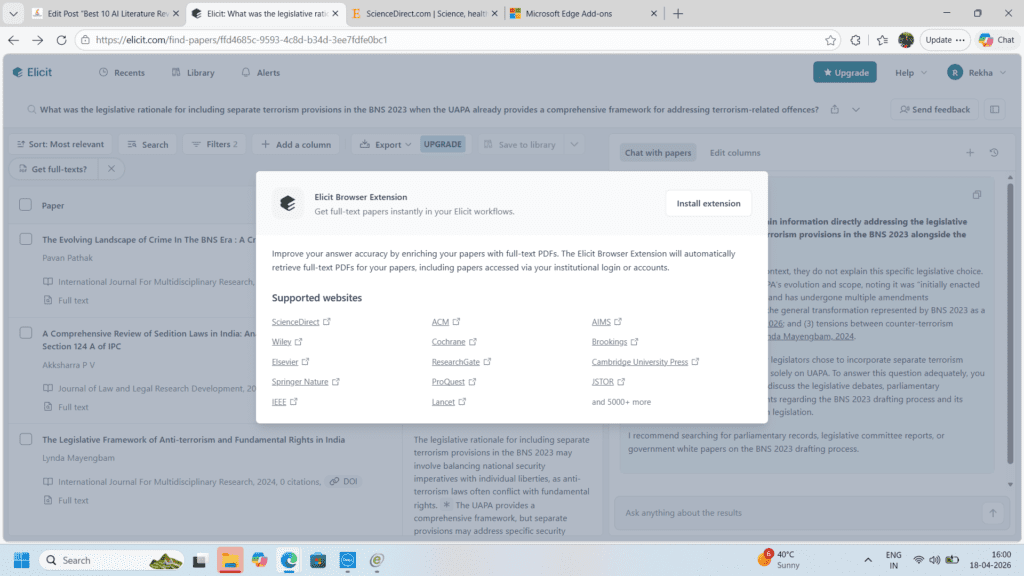
01. Define Your Research Question
Foundation step Elicit Perplexity AI
| What to do Before searching for a single paper, get your research question as specific as possible. A vague question (“how does AI affect education?”) produces thousands of irrelevant results. A focused question produces useful ones. | How AI helps here Use Elicit to test your research question. Type it in and see what existing literature exists. If Elicit returns 2,000 loosely related papers, your question is too broad. If it returns 5, it may be too narrow. |
| Example Too broad: “Does AI help students learn?” Good: “What is the effect of AI-powered feedback tools on undergraduate writing improvement in online learning environments?” | When to use this step At the very beginning — before any database search. Spend 1–2 hours refining your question with Elicit before moving to systematic paper searching. |
Use Perplexity AI (Academic mode) to explore the landscape first: “What are the main debates around [your topic] in recent research?” This gives you a fast overview and surfaces key terms you may not have known to search for.
02. Search for Research Papers
Discovery step Semantic Scholar Elicit Google Scholar
| What to do Search systematically using your refined keywords across multiple sources. Don’t rely on a single database — each one has different coverage strengths depending on your discipline. | How AI helps here Semantic Scholar searches 200M+ papers and provides AI-generated TLDRs for each result — so you can scan relevance across 50 papers in the time it used to take to read 5 abstracts. |
| Example Enter your refined research question into Elicit. Filter results by year (last 5 years for recency, broader for foundational works). Export the results table — it already contains title, year, findings, and methods. | When to use this step After finalising your research question. Run searches on at least 2–3 databases. Semantic Scholar for breadth, your institution’s subscribed databases (Scopus, PubMed) for depth in your specific field. |
Set up research alerts on Semantic Scholar for your key terms. Any new paper matching your topic will be emailed to you automatically — so your literature stays current throughout your PhD.
03. Summarise Papers at Scale
Screening step Elicit SciSpace NotebookLM
| What to do You now have a list of potentially relevant papers. Your goal at this stage is to identify which papers deserve full reading and which can be screened out quickly. | How AI helps here SciSpace (formerly Typeset) lets you upload a PDF and ask direct questions: “What was the sample size?”, “What did this study find?” — getting structured answers without reading the full paper first. |
| Example Upload 10 PDFs to NotebookLM. Ask: “Which of these papers directly addresses [your specific research question]?” It reads across all your documents simultaneously and tells you which are most relevant. | When to use this step After your initial search returns 50–200 papers. Use AI summaries to screen down to the 20–30 most relevant before committing to full readings. This alone saves 10–15 hours of work. |
In Elicit, the “Outcomes” column extracts what each paper actually found — not just what it studied. This is the single most powerful free feature for fast literature screening.
04. Map the Research Field
Mapping step ResearchRabbit Connected Papers
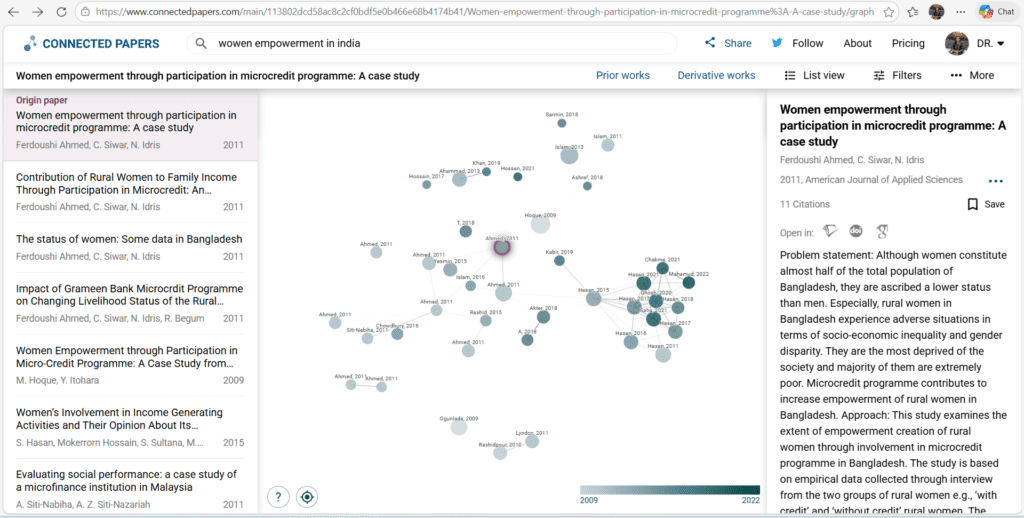
| What to do Find out how papers in your field relate to each other. Identify the foundational works, the most-cited recent papers, and the emerging directions that represent where your field is heading. | How AI helps here Connected Papers takes one seed paper and generates a visual graph of related works based on citation and bibliographic relationships — revealing the intellectual map of your field in seconds. |
| Example Take your single strongest paper and enter it into Connected Papers. The central cluster shows the core theoretical framework of your field. Papers on the edges are either foundational predecessors or emerging new directions. | When to use this step After initial screening, before deep reading. Understanding the field map helps you prioritize which papers to read in full and ensures you don’t miss important foundational work that manual searching might have skipped. |
ResearchRabbit is free and unlimited — use it to build a collection of your screened papers and let it recommend related works you may have missed. Save the map as a screenshot for your research notes.
05. Validate Your Sources
Quality check step Scite.ai Consensus
Mapping step ResearchRabbit Connected Papers
| What to do Not all citations are created equal. Before building your argument on a paper, check whether its findings are broadly supported, actively contested, or simply being acknowledged in passing by other researchers. | How AI helps here Scite.ai shows you supporting vs contrasting citations for any paper — a signal of scholarly quality that raw citation counts completely miss. A highly-cited paper that’s mostly contrasted is a weak foundation. |
| Example You want to cite Paper X as support for your theoretical framework. Scite shows 48 supporting citations and 3 contrasting. Strong foundation. If it shows 20 supporting and 18 contrasting — note the debate and address it in your review. | When to use this step Before your deep-reading phase. Validate your 15–20 most important papers with Scite to make sure you understand not just what they found, but how they are received in the field. |
Use Consensus alongside Scite. Ask Consensus your research question directly — it will show you whether the literature broadly agrees, disagrees, or is mixed. This shapes your literature review narrative significantly.
06. Organise Your Literature
Organisation step Zotero Notion NotebookLM
| What to do Structure your collected papers into thematic groups that will become the sections of your literature review. Don’t organise by author or year — organise by theme and argument. | How AI helps here Upload all your shortlisted papers into NotebookLM. Ask: “What are the main themes that emerge across these papers?” It reads all documents simultaneously and suggests thematic groupings based on your actual literature. |
| Example Create a Notion database with columns: Paper Title | Theme | Main Finding | Supports/Challenges Your Argument | Notes. Fill this from your AI-assisted summaries. This becomes your writing scaffold. | When to use this step After deep reading is complete. All your reading should feed into this organised structure. If you skip this step and go straight to writing, your review will lack analytical coherence — a common examiner criticism. |
In Zotero, create collections for each theme. Tag papers with argument positions (supports / challenges / neutral to your thesis). When writing, you can instantly pull all papers that support a specific point.
07. Write the Literature Review
Writing step Paperpal Writefull NotebookLM
| What to do Write your literature review thematically — one section per major theme you identified in Step 6. Each section should synthesize what multiple papers say, not just summarize them one by one. | How AI helps here Paperpal improves your academic phrasing as you write — it’s trained on peer-reviewed literature and understands scholarly register. Writefull provides sentence-level feedback and can improve your abstract once you’re done. |
| Example For each theme section, open NotebookLM with that theme’s papers loaded. Ask: “Summarize the key findings and debates around [theme] from these papers.” Use this as your starting framework — then rewrite it completely in your own analytical voice. | When to use this step Only after Steps 1–6 are complete. Researchers who jump to writing without completing the earlier steps typically produce reviews that are descriptive rather than analytical — and need major revision. |
The key to a great literature review chapter is synthesis — not summary. Your voice should connect the papers, identify patterns, highlight contradictions, and build toward your research gap. AI tools support that process; they cannot replace it.
Workflow Summary
Here is the complete step-by-step literature review process in one visual summary — from question to written chapter.
AI Literature Review Workflow — 7 Steps
- Step 1 → Elicit + Perplexity for Define Question
- Step 2 → Semantic Scholar for Search Papers
- Step 3 → SciSpace + NotebookLM for Summarise & Screen
- Step 4 → Connected Papers + ResearchRabbit for map the field
- Step 5 → Scite.ai + Consensus for Validate Sourc
- Step 6 → Zotero + Notion for Organise by Theme
- Step 7 → Paperpal + Writefull for Write the Review
Best Tools by Researcher Type
| For Beginners Elicit + Zotero Simplest entry point. Elicit searches and summarises; Zotero saves and formats. Two tools, complete coverage. |
| For PhD Students Elicit + Connected Papers + Scite Covers search, field mapping, and source validation — the three stages PhD examiners look most critically at. |
| Completely Free Toolkit Semantic Scholar + ResearchRabbit + Zotero + NotebookLM All four are free with no meaningful caps. A complete literature review workflow at zero cost. |
| For Systematic Reviews Rayyan + Scite + Consensus Purpose-built for systematic and scoping reviews requiring rigorous screening, PRISMA compliance, and evidence quality assessment. |
Common Mistakes in AI-Assisted Literature Reviews
- Starting too broad: Searching “artificial intelligence in education” instead of your specific research question returns thousands of loosely relevant papers. Refine first, search second — always.
- Trusting AI summaries without reading key papers: AI summaries are screening tools, not replacements for reading. Your 15–20 most critical papers must be read in full. No exceptions.
- Organising by author instead of theme: A literature review that goes “Smith (2019) found X. Jones (2020) found Y. Kumar (2021) found Z.” is a list, not a review. Organise by theme and synthesize across authors.
- Skipping the validation step: Citing a paper without knowing whether its findings are supported or contested in the field is a risk. Scite.ai makes validation take 2 minutes — there is no reason to skip it.
- Jumping to writing before organising: Writers who skip Step 6 (thematic organisation) consistently produce reviews that lack analytical structure. The Notion database step is not optional — it becomes your entire writing scaffold.
- Not disclosing AI tool use: Every AI tool used in your literature review process — Elicit, NotebookLM, SciSpace — must be disclosed in your methodology section. Check your institution’s AI policy before submitting.
Tips to Save Even More Time
- Use boolean operators in Semantic Scholar: Search “AI AND writing AND “higher education”” with quotes and operators to dramatically reduce irrelevant results from the start.
- Export Elicit results as a spreadsheet: The exported table gives you title, year, findings, methods, and sample size in columns — your entire screening database ready to sort and filter.
- Build your Zotero library as you go: Add papers to Zotero the moment you find them — not in a panic before submission. The browser plugin takes 2 seconds per paper.
- Use NotebookLM as a dialogue partner: Once your key papers are uploaded, ask it “What would be the strongest critique of my current argument?” This helps you anticipate examiner questions before you write.
- Set a firm screening rule: Decide your inclusion criteria before searching (year range, study type, language, discipline). Papers that don’t meet criteria get excluded immediately — no “maybe” pile.
AI Ethics Checklist for PhD Research: A Practical Guide
My Recommended AI Literature Review Workflow
After working with PhD students across multiple disciplines, here is the exact workflow I recommend for a standard 3–4 week literature review using AI tools:
- Day 1–2: Refine your research question with Elicit. Run 3–4 keyword variation searches. Export results to a spreadsheet.
- Day 3–5: Screen the results using Elicit’s outcomes column + SciSpace for full paper summaries. Reduce to 25–35 shortlisted papers.
- Day 6–7: Map the field using Connected Papers (3–4 seed papers). Add all shortlisted papers to ResearchRabbit and save the visual map.
- Day 8–9: Validate your top 15–20 papers using Scite.ai. Note which are supported vs contested. Add all papers to Zotero with proper tagging.
- Day 10–14: Deep read your final 20–25 papers. Take notes directly in Zotero or Notion using the thematic structure identified in your mapping step.
- Day 15–18: Build your thematic Notion database. Use NotebookLM to identify any gaps or overlooked connections across your reading.
- Day 19–21: Write section by section. Use Paperpal and Writefull for language polish. Run final draft through Grammarly and iThenticate before sending to supervisor.
Frequently Asked Questions
Q. How do you do a literature review using AI tools?
Follow the 7-step AI workflow: (1) refine your research question with Elicit, (2) search with Semantic Scholar, (3) summarize with SciSpace, (4) map the field with Connected Papers, (5) validate with Scite.ai, (6) organize by theme in Notion, and (7) write using Paperpal. Each step builds on the last.
Q. Which AI tool is best for literature review in 2026?
Elicit is the strongest single tool for literature review — it searches 200M+ papers, auto-extracts key findings, and exports structured results. For a complete workflow, combine Elicit (search + screen), Connected Papers (field mapping), and Scite.ai (source validation). All three have free tiers sufficient for PhD-level literature reviews.
Q. Can AI replace a literature review entirely?
No — and it should not. AI tools handle the mechanical parts: searching, screening, summarizing, and organizing. The critical reading, thematic synthesis, gap identification, and scholarly argument are yours alone. A literature review written entirely by AI will lack the analytical depth examiners expect and will likely fail the viva voce.
Q. How long does a literature review take with AI tools?
A standard PhD literature review chapter using the AI workflow outlined here typically takes 3–4 weeks of focused work — compared to 6–10 weeks using traditional manual methods. The biggest time savings come in Steps 2 and 3: paper searching and abstract screening, which together can save 10–15 hours per review.
Q. Do I need to disclose AI tools used in my literature review?
Yes — in most institutions in 2026, you must disclose any AI tools used in your research methodology, including literature review tools. A brief statement such as “Elicit was used to support initial paper identification; all sources were independently verified and read by the researcher” is typically sufficient. Always check your university’s specific current policy.
References
- Elicit.org
Official site: Elicit: AI for scientific research
Details: 125M+ papers, 95% accuracy on complex queries, free tier with Pro at $12/mo. Used by 2M+ researchers. - Research Rabbit
Official site: ResearchRabbit.ai
Details: Free visual citation maps, collaborative collections. - Scite.ai
Official site: scite.ai
Details: 1.2B citations analyzed, Pro $20/mo, citation context analysis. - Consensus
Official site: consensus.app
Details: 200M+ papers, free meta-analysis answers, Pro $8.99/mo. - Connected Papers
Official site: connectedpapers.com
Details: Visual graphs, free tier available. - Semantic Scholar
Official via: semanticscholar.org
Details: Allen Institute’s free 200M+ paper database with AI summaries.
About the Author
Dr. Rekha Khandelwal Research Mentor · Academic Content Strategist · AI Workflow Specialist
She specialises in breaking complex academic workflows into clear, practical steps that researchers can follow regardless of their discipline or technical background.
Her approach to AI-assisted research is grounded in one belief: technology should remove friction from the research process, not replace the scholarly thinking that makes research meaningful. she helps universities and EdTech platforms design ethical, practical AI integration frameworks for academic programmes.

15 Best Free AI Tools Every PhD Student Needs in 2026
15 Best Free AI Tools for PhD Students 2026 Finding the best free AI tools…

7 AI Data Analysis Tools for PhD in 2026
AI Data Analysis Tools AI Research Revolution 2026: Complete PhD Workflow Guide A simple guide…

AI Ethics and Future: Complete Guide to Responsible AI in 2026
AI Ethics and Future Why AI Ethics Matters More Than Ever Think about the last…
AI Ethics Checklist for PhD Research: A Practical Guide
AI Ethics Checklist for PhD Research 10-Point Compliance Checklist 2026 Everything you need to use…

AI in Education in 2026: How Artificial Intelligence Is Transforming Teaching and Learning
Think about a Class 10 student in Jaipur. It is 10 pm. She is stuck…

AI Research Revolution 2026: Complete PhD Workflow Guide
AI Research Revolution 2026 The complete AI PhD research workflow 2026 is changing how researchers…