
Last Updated: April 19, 2026
15 Best Free AI Tools for PhD Students 2026
Finding the best free AI tools PhD students 2026 can actually use — without spending a rupee or dollar — is harder than it sounds. Search online and you’ll find lists full of paid tools dressed up as “free,” buried limitations, or tools so complex they need a manual just to get started.
I know how it feels. You are juggling coursework, a supervisor’s feedback, a mountain of papers to read, and the constant pressure to publish. The last thing you need is to waste hours figuring out a tool that doesn’t even work for your research stage.
This guide is different. I’ve gone through dozens of tools and handpicked 15 that are genuinely free, practical, and built for academic research. Whether you are just starting your PhD journey or deep into your thesis, there is something here for you.
Every tool in this list has a usable free tier — not a 7-day trial. You can start using them today without entering a credit card.
Why PhD Students Need AI Tools in 2026
Let me be honest with you. The PhD process hasn’t changed — it’s still years of deep, rigorous work. But the tools available to support that work have changed dramatically. Ignoring them means doing in 10 hours what your peers are finishing in 2.
- Time-saving: AI tools can scan hundreds of papers, summarize findings, and surface key insights in minutes — not weeks.
- Better research quality: With AI-assisted literature mapping, you spot connections across fields that manual searching would miss entirely.
- Handling large data: Whether it’s a 5,000-row survey dataset or 40 interview transcripts, AI tools process and organize it faster than any spreadsheet.
- Writing confidence: AI writing assistants trained on academic English help non-native speakers and even native speakers sound more precise and scholarly.
You don’t need every tool on this list. Pick 3–4 that match your current research phase and master those. Depth beats breadth every time.
15 Best Free AI Tools for PhD Students 2026
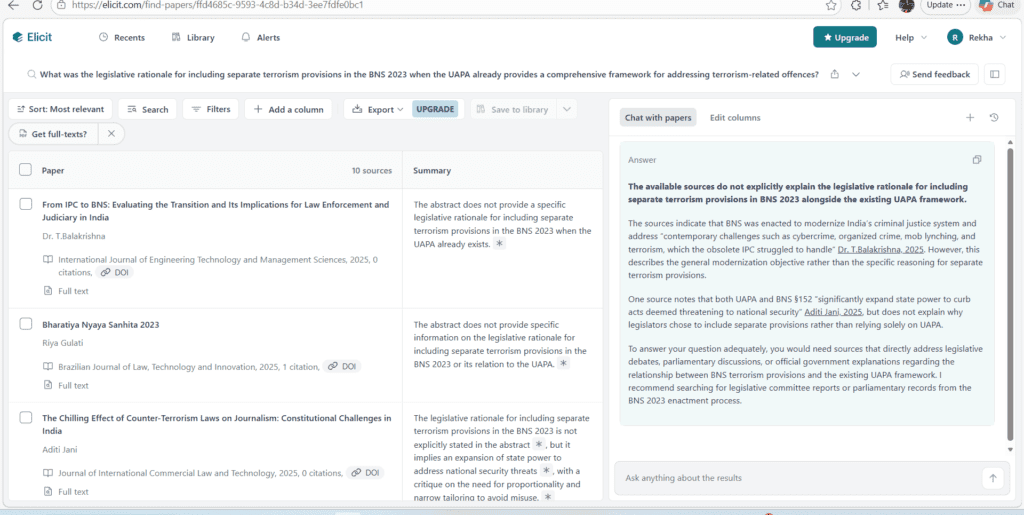
01. Elicit
| elicit.org — AI research assistant | Literature Review |
| What it does Uses AI to search, surface, and summarize academic papers from a database of 200M+ research articles. | Key features Ask research questions in simple English Auto-extracts key findings per paper Exportable summary tables |
| How it helps Instead of reading 50 papers to find 10 relevant ones, Elicit does the screening for you and shows what each paper found. | Best use case Starting your literature review. Type your research question and get a structured paper table in 5 minutes. |
Free tier: 5,000 credits/month (~200 searches). Enough for regular daily use in most PhD workflows.
02. Semantic Scholar
| semanticscholar.org — AI-powered academic search | Research Discovery |
| What it does A free AI-powered academic search engine covering 200M+ papers, with smart citation and relevance filtering. | Key features TLDR summaries for papers Citation velocity tracking Personalized research alerts |
| How it helps If you are a PhD student who already found one good paper, Connected Papers instantly maps the entire related field around it. | Best use case Understanding a new research field quickly. Drop in your best source paper and see the whole ecosystem in minutes. |
Fully free — no paid tier. Unlimited searches with no signup required
03. Connected Papers
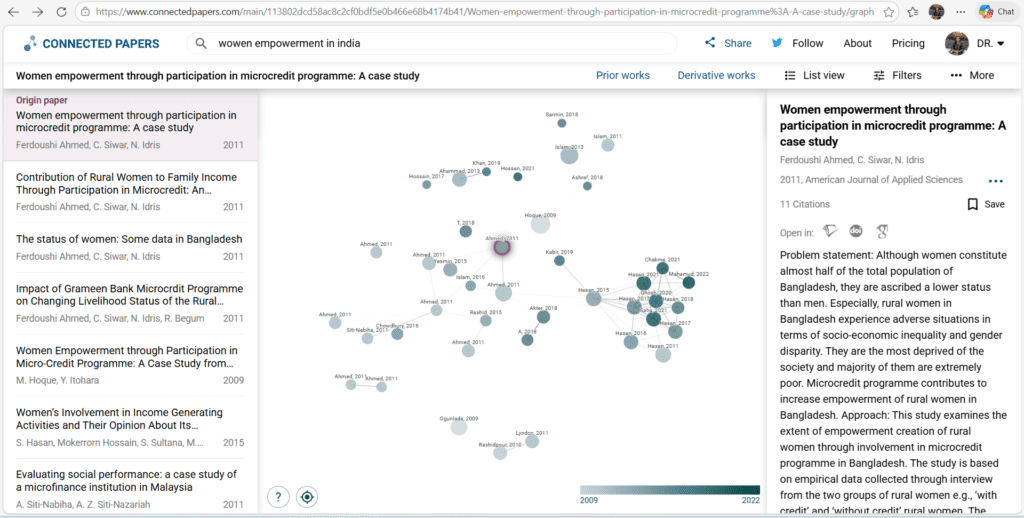
| connectedpapers.com — Visual paper mapping | Research Discovery |
| What it does Creates a visual graph of how academic papers are connected to each other by citation and co-citation relationships. | Key features Interactive visual paper map Identifies foundational + recent work Works from any seed paper |
| How it helps You can set alerts for new papers on your topic — so you never miss important new research without constant searching. | Best use case Ongoing literature monitoring. Set up keyword alerts and check weekly updates instead of manual daily searches. |
Free: 5 graphs/month. Upgrade for unlimited. Most PhD students find 5 per month sufficient for chapter planning.
04. ResearchRabbit
| researchrabbit.ai — Smart paper tracking | Research Discovery |
| What it does A free, Spotify-like tool for academic papers. It learns your reading habits and suggests new relevant papers. | Key features Paper collection management Visual citation networks Email alerts for new papers Integrates with Zotero |
| How it helps This tool can save you hours of manual searching. Add 5 papers you love, and it surfaces 20 more you should read. | Best use case Early literature exploration when you’re building your reading list from scratch. |
100% free — no paid tier currently. Completely unlimited for all users
05. Consensus
| consensus.app — Evidence-based AI search | Literature Review |
| What it does An AI search engine that searches research papers specifically and gives you consensus-based answers, not just paper links. | Key features “Yes/No/Mixed” answer summaries Cites supporting papers automatically Smart filters by study type |
| How it helps Perfect for validating your research hypothesis. Ask “Does intervention X improve outcome Y?” and get an evidence-backed answer. | Best use case Hypothesis validation and building the argument for your research gap section. |
Free: 20 searches/day. Sufficient for focused daily research sessions without needing paid access.
06. Perplexity AI
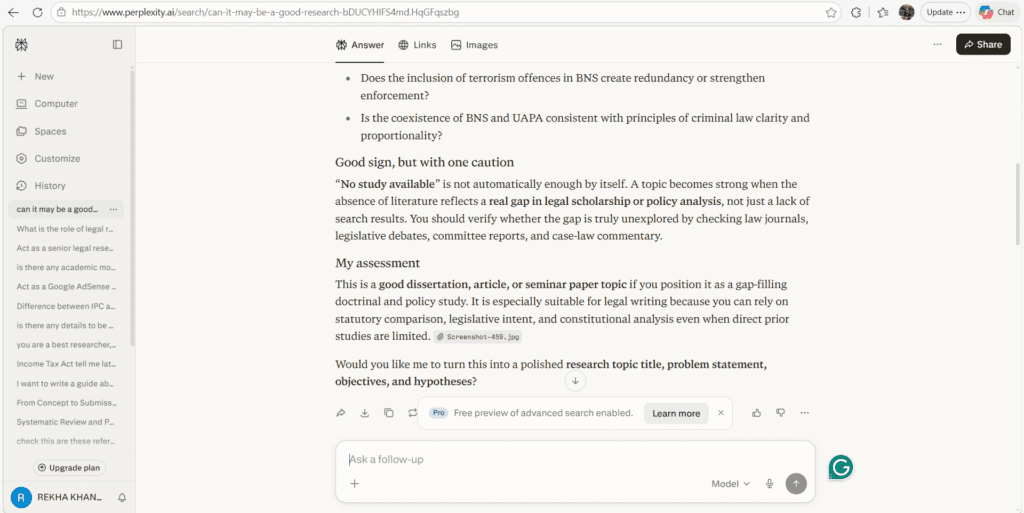
| perplexity.ai — Real-time AI research chat | Research Discovery |
| What it does An AI answer engine that searches the live web and academic sources, then provides cited answers in conversational form. | Key features “Academic” search mode All answers come with citations Follow-up question support |
| How it helps Great for quick topic scoping. Ask a broad question, get a cited overview, then drill down into specific papers from the sources. | Best use case Early topic exploration and staying current with very recent developments in your field. |
Free with limited daily queries in “Pro” mode. Standard mode is unlimited and still excellent for academic use.
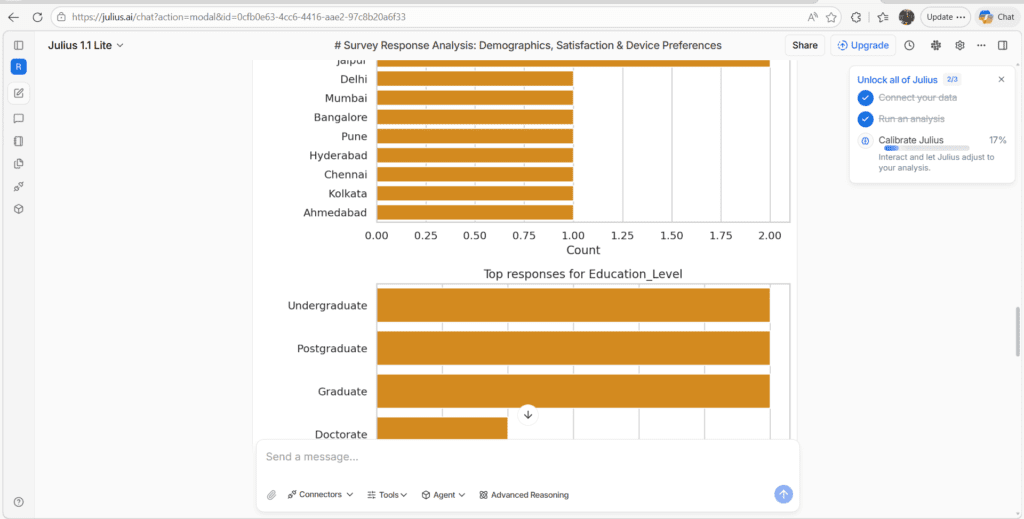
07. Julius AI
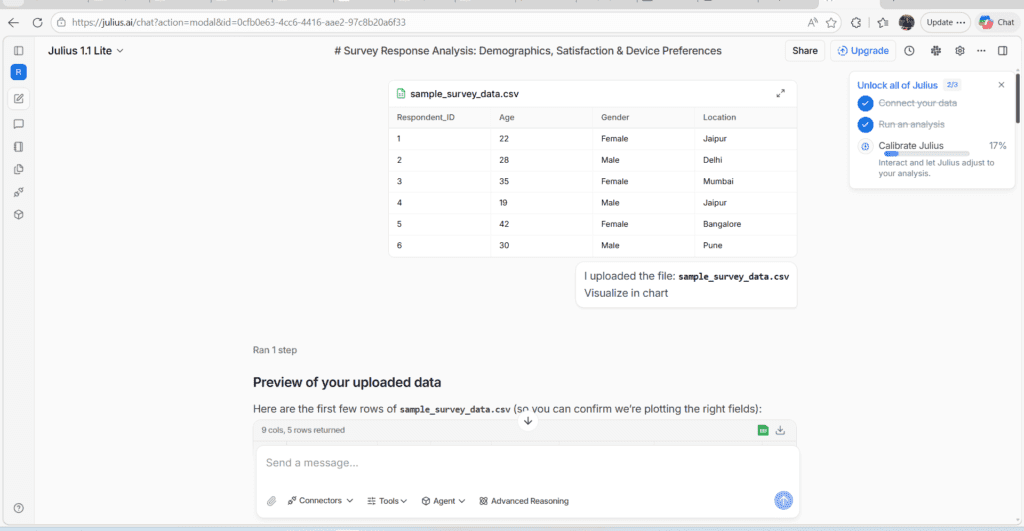
| julius.ai — Natural language data analysis | Data Analysis |
| What it does Lets you upload CSV/Excel files and ask questions in simple English to get charts, statistics, and insights automatically. | Key features Upload any spreadsheet or CSV Generates charts automatically Explains statistical outputs in simple English |
| How it helps If you have survey data but don’t know Python or SPSS, Julius AI is a game-changer. Just ask “show me the correlation between X and Y.” | Best use case Quantitative research chapters. Analyze your primary data without writing a single line of code. |
Free tier: limited monthly messages. Best used for focused analysis sessions rather than continuous data exploration.
08. ATLAS.ti (Free Edition)
| atlasti.com — Qualitative research analysis | Data Analysis |
| What it does A qualitative data analysis tool with an AI coding assistant for interview transcripts, open-ended surveys, and document analysis. | Key features AI-assisted thematic coding Supports text, audio, video, images Visualizes code networks |
| How it helps If you are a PhD student doing qualitative research, ATLAS.ti reduces manual coding time from weeks to days with its AI-suggested codes. | Best use case Thematic analysis of interviews, focus groups, or open-ended questionnaire responses. |
Free edition is limited to 10 documents and 100 quotations. Enough for pilot or small-scale qualitative studies.
09. Paperpal
| paperpal.com — Academic writing assistant | Writing & Editing |
| What it does An AI writing assistant trained specifically on academic text from millions of peer-reviewed papers and journals. | Key features Journal-specific language suggestions Grammar + academic tone checker Works inside MS Word |
| How it helps Unlike general tools, Paperpal understands academic phrasing. It won’t turn your scholarly writing into blog-style casual text. | Best use case Polishing your thesis chapters and journal manuscript drafts before supervisor review. |
Free: 200 suggestions/month via web. MS Word plugin requires a paid plan for full features.
10. Writefull
| writefull.com — Language feedback for researchers | Writing & Editing |
| What it does Provides AI language feedback specifically for academic writing, trained on published academic texts from Springer and Wiley. | Key features Sentence-by-sentence feedback Abstract review tool Title generator for papers |
| How it helps This tool can save you hours of editing. Its abstract reviewer alone is worth using before every journal submission. | Best use case Finalizing your abstract, introduction, and discussion sections before journal submission. |
Free for students with institutional email. Premium unlocks more suggestions but free tier is highly functional.
11. Zotero
| zotero.org — Reference management | Citation Management |
| What it does The gold-standard free reference manager that auto-captures paper metadata and formats citations in any style instantly. | Key features One-click browser capture 9,000+ citation styles MS Word + Google Docs plugin PDF annotation sync |
| How it helps You will never manually type a reference again. Save papers as you browse and cite them with one click while you write. | Best use case Every PhD student needs this from day one. Mandatory tool for reference organization and citation formatting. |
Free: 300MB cloud storage. Use local storage or upgrade for more cloud space — local storage is unlimited and free.
12. Mendeley
| mendeley.com — Reference + PDF manager | Citation Management |
| What it does A free reference manager by Elsevier with a built-in PDF reader, annotation tools, and citation plugin for Word. | Key features Built-in PDF reader with highlights Desktop + mobile apps Research network for collaboration |
| How it helps Combines your PDF library and citation manager in one place. Read, annotate, and cite all within a single tool. | Best use case Researchers who want to annotate PDFs and cite them directly without switching between apps. |
Free: 2GB storage. Sufficient for most PhD thesis workflows when combined with local folders for large PDF libraries.
13. Grammarly (Free)
| grammarly.com — Writing clarity checker | Writing & Editing |
| What it does Real-time grammar, spelling, and clarity checker that works across browsers, Word, and Google Docs as you type. | Key features Real-time grammar checking Tone detection Works everywhere (browser, apps) |
| How it helps Catches errors your eye misses after staring at a chapter for hours. Particularly useful for non-native English writers. | Best use case Final proofreading pass on every chapter, email to supervisor, and conference abstract. |
Free tier handles grammar and spelling. Clarity, style, and plagiarism features require Premium — but basics are very useful alone.
14. Rayyan
| rayyan.ai — Systematic review screening | Literature Review |
| What it does An AI-powered tool built specifically for systematic literature reviews — import papers, screen abstracts, and collaborate with your team. | Key features Import from PubMed, Scopus, etc. AI-suggested include/exclude Blinded collaborative screening |
| How it helps If you are running a systematic review, Rayyan cuts abstract screening time by up to 50% with AI pre-suggestions. | Best use case Health, medicine, education, and social science PhD students conducting systematic or scoping reviews. |
Free for solo researchers. Team collaboration and advanced AI features require a paid plan for groups larger than 2.
15. Scite.ai (Free Tier)
| scite.ai — Smart citation context | Literature Review |
| What it does Shows how a paper has been cited — whether other studies support, contrast, or simply mention its findings. Not just raw citation counts. | Key features Supporting vs. contrasting citations Citation context snippets Visualizes citation quality |
| How it helps Helps you evaluate whether a foundational paper in your field is broadly supported or widely debated — crucial for your literature review framing. | Best use case Evaluating the reliability and debate status of key papers in your literature review and theoretical framework. |
Free: limited lookups per month. Enough for checking your 10–15 most critical reference papers each month.
Tools by Research Category
Not sure which tool to use for which task? Here’s a quick reference map.
| Literature Review Elicit, Consensus, Rayyan, Scite.ai | Research Discovery Semantic Scholar, Connected Papers, ResearchRabbit, Perplexity | Data Analysis Julius AI, ATLAS.ti | Writing & Editing Paperpal, Writefull, Grammarly | Citation Management Zotero, Mendeley |
Free vs Paid: What You Actually Get
| Tool | Free Gives You | Paid Adds |
| Elicit | ~200 searches/month, full table outputs | Unlimited searches, full PDF analysis |
| Zotero | Unlimited local storage, all citation features | Cloud storage expansion (6GB+) |
| Paperpal | 200 language suggestions/month | Unlimited + MS Word full integration |
| Writefull | Full access with institutional email | More suggestion volume, priority support |
| ResearchRabbit | Completely unlimited — no paid tier | — |
| Julius AI | Limited monthly messages | Unlimited analysis, advanced models |
Bottom Line: For most PhD students in early to mid-thesis stages, the free tiers of these tools are more than enough. Consider upgrading only when you hit a specific limit that’s blocking your daily workflow.
Best Tools for Beginners
If you are new to AI tools, start with these three. They are the easiest to use and give you the highest return on the time you invest in learning them.
- Zotero — Install it on day one of your PhD. You’ll thank yourself at thesis submission.
- Semantic Scholar — No learning curve. It looks like Google. Just search and read.
- Elicit — Ask a plain-English question and get a structured table of papers. That’s it.
Best Tools for Literature Review Specifically
Your literature review is the foundation of your entire thesis. These tools are purpose-built for that task:
- Elicit — For extracting findings from multiple papers at once
- Connected Papers — For mapping the visual landscape of a research area
- Rayyan — For systematic reviews with large paper pools to screen
- Scite.ai — For checking whether your key sources are supported or debated
- Consensus — For validating whether there is scientific agreement on your topic
My Recommended Top 5 Free AI Toolkit
If I had to give every PhD student exactly five tools to start with today, this would be it:
- 1. Zotero – Use it from day one. Build your reference library as you read, and citations write themselves.
- 2. Elicit – Your first stop for any literature search. Ask questions in plain English, get structured results.
- 3. ResearchRabbit – Connects to Zotero, maps related papers, sends you alerts. Totally free and surprisingly powerful.
- 4. Julius AI – For data analysis without coding. Upload your data, ask questions, get charts instantly.
- 5. Writefull – Free with university email. Polishes your academic English before every submission.
Common Mistakes PhD Students Make with AI Tools
- Using too many tools at once: Jumping between 10 different platforms creates confusion and wastes more time than it saves. Pick your core 3–5 tools and stick to them.
- Not verifying AI outputs: Always check paper summaries and AI-generated insights against the original source. Errors do happen.
- Treating AI writing as final text: AI-assisted writing tools help you draft and polish — they are not a replacement for your own analysis and argument.
- Forgetting to disclose tool usage: Many universities require you to note which AI tools you used in your methodology section. Check your institution’s policy now.
- Skipping Zotero until the end: This is the most painful mistake. Add every paper to Zotero as you read it — not in a panic the week before submission.
Frequently Asked Questions
Q. What are the best free AI tools for PhD students in 2026?
The best free AI tools for PhD students include Elicit for literature search, Zotero for citation management, ResearchRabbit for paper discovery, Julius AI for data analysis, and Writefull for academic writing. All have functional free tiers you can start using today — no credit card needed.
Q. Are free AI tools enough for serious PhD research?
Yes — for most PhD workflows, free tiers are more than sufficient. Zotero is fully free for local use. ResearchRabbit has no paid plan at all. Elicit’s free credits cover regular daily searches. Upgrading is only worthwhile when you consistently hit specific usage limits that
Q. Do I need to tell my university I’m using AI tools?
Yes, in most cases. Most universities in 2026 require disclosure of AI tool usage in your methodology section, particularly for writing assistance and data analysis. Using tools for reference management or paper searching typically does not require disclosure — but always check your institution’s specific guidelines.
About the Author
Dr. Rekha Khandelwal PhD Research Mentor · Academic Writer · AI Content Strategist
She specializes in making complex research processes genuinely simple for students at every stage. Beyond academic guidance, Dr. Rekha is a certified AI content strategist helping researchers, universities, and EdTech platforms adopt AI tools ethically and effectively.
Free AI tools for PhD students in 2026 are not shortcuts.
They are force multipliers.
AI In Research : How Artificial Intelligence Is Transforming Academic Research 2026
References:
- Semantic Scholar www.semanticscholar.org
- Research Rabbit www.researchrabbit.ai
- Elicit elicit.com
- NotebookLM notebooklm.google.com
- Perplexity AI www.perplexity.ai
- Consensus consensus.app
- Scite.ai scite.ai
- DeepSeek www.deepseek.com
- Paperpal www.paperpal.com
15 Best Free AI Tools Every PhD Student Needs in 2026
15 Best Free AI Tools for PhD Students 2026 Finding the best free AI tools…

7 AI Data Analysis Tools for PhD in 2026
AI Data Analysis Tools AI Research Revolution 2026: Complete PhD Workflow Guide A simple guide…

AI Ethics and Future: Complete Guide to Responsible AI in 2026
AI Ethics and Future Why AI Ethics Matters More Than Ever Think about the last…
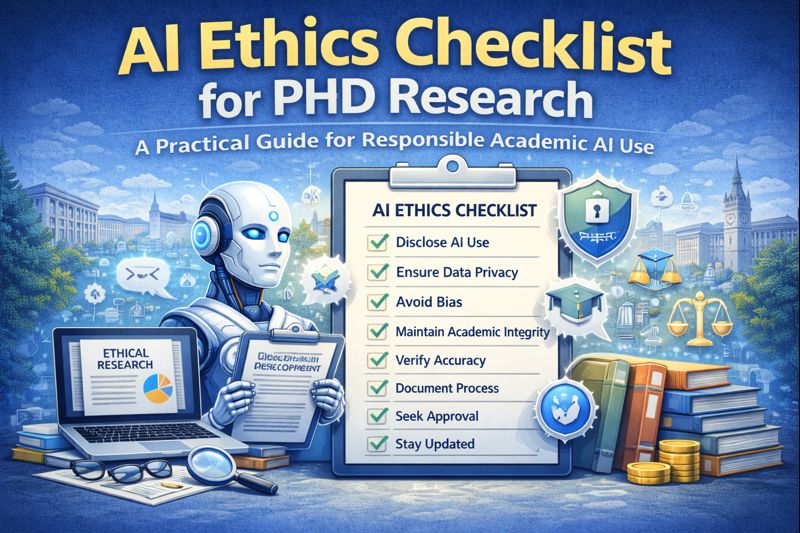
AI Ethics Checklist for PhD Research: A Practical Guide
AI Ethics Checklist for PhD Research 10-Point Compliance Checklist 2026 Everything you need to use…

AI in Education in 2026: How Artificial Intelligence Is Transforming Teaching and Learning
Think about a Class 10 student in Jaipur. It is 10 pm. She is stuck…

AI Research Revolution 2026: Complete PhD Workflow Guide
AI Research Revolution 2026 The complete AI PhD research workflow 2026 is changing how researchers…

EU AI Act: Complete Researcher-Friendly Guide (Compliance Timeline to 2026)
What Is the EU AI Act? (In Simple) Imagine you build a robot that helps…

How to Do a Literature Review Using AI Tools
Imagine opening your research database and seeing hundreds of papers on your topic. Instead of…